
Your Kindle doesn’t have to be just a plain e-reader. There are many great Kindle accessories to add a little personality to your device and keep it safe from bumps and drops. Some handy accessories even make it easier to read, add more accessibility options, or just offer freedom from holding up another gadget next to your face. (I’m holding my phone enough already, thank you very much.)
If you’re shopping around for new Kindle accessories, we’ve got you covered. We’ve tried everything from clear cases you can fill with stickers to ones with built-in straps, and have tested straps you can add to your e-reader without needing a case. Stickers? Charms? We got ’em. Hate holding up your Kindle? Try a Kindle holder and a page-turning remote. This guide will give you ideas left and right to stock up on.
While you’re here, be sure to read our other reader-friendly guides, including the Best Kindles, Best E-Readers, Best Color E-Readers, Best Gifts for Book Lovers, Best Digital Notebooks, Best Tablets, and Best iPads.
Updated February 2026: We’ve reorganized this guide and added several new picks and sections.
Kindle Cases and Covers
An easy must-have for any Kindle reader is a case or cover to protect your e-reader. Here are some of my favorites that I’ve tried on my various Kindles.
Kindle Straps and Grips
Looking for an easier way to hold your Kindle? Add these straps and grips right onto the Kindle or the case.
Kindle Holders
Hate holding up your Kindle? Or struggle with chronic pain that makes holding it feel terrible? These holders will literally take the weight out of your hands.
A Kindle Page Turner
The hottest new item to get as a Kindle lover is a page turner. They’re especially handy for holders like the ones above, where your hands aren’t already on the device, and can make for a great accessibility accessory for readers with different needs.
My biggest irritation with these devices so far is that you have to charge them both individually, and if one runs out of battery, the whole thing is useless. I also don’t love that the turner does tend to block at least one letter while I read, and you can’t place it on the lower or upper margins since it’ll activate the menus instead of turning the page. Still, it makes reading ultra comfortable, especially for my strained wrists.
Here’s my favorite one so far that’s been solid at holding a charge, and next I’m testing this remote ($15) with a wearable ring clicker instead of a remote.
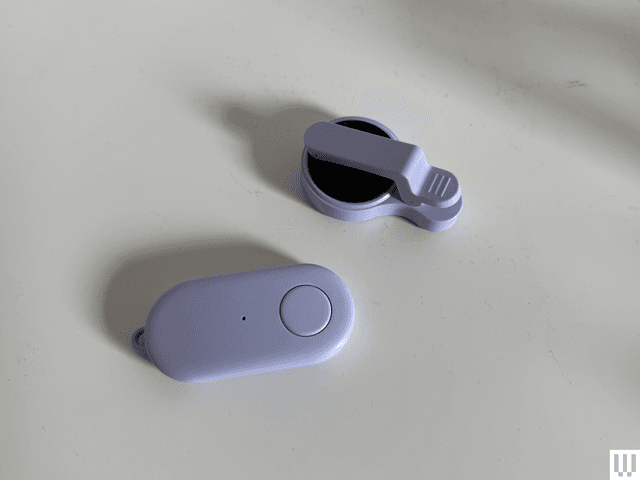
This remote comes in a variety of cute colors and is easy to use with its clip-on turner. You’ll need to charge both halves individually, and place the thinner side of the clip onto your Kindle.
n”,”productBrand”:”Highgo”,”dangerousHed”:”Remote Control Page Turner for Kindle”,”embedSize”:”feature-medium”,”isFirstProduct”:false,”image”:[{“altText”:”Image may contain: Electronics, Phone, and Mobile Phone”,”credit”:”Photograph: Nena Farrell”,”contentType”:”photo”,”sources”:{“sm”:{“aspectRatio”:”4:3″,”width”:320,”url”:”https://media.wired.com/photos/698d5d653e7b9ed846dfb0d7/4:3/w_320,c_limit/page%20turner%20source%20nena%20farrell.png”,”srcset”:”https://media.wired.com/photos/698d5d653e7b9ed846dfb0d7/4:3/w_120,c_limit/page%20turner%20source%20nena%20farrell.png 120w, https://media.wired.com/photos/698d5d653e7b9ed846dfb0d7/4:3/w_240,c_limit/page%20turner%20source%20nena%20farrell.png 240w, https://media.wired.com/photos/698d5d653e7b9ed846dfb0d7/4:3/w_320,c_limit/page%20turner%20source%20nena%20farrell.png 320w”},”md”:{“aspectRatio”:”4:3″,”width”:640,”url”:”https://media.wired.com/photos/698d5d653e7b9ed846dfb0d7/4:3/w_640,c_limit/page%20turner%20source%20nena%20farrell.png”,”srcset”:”https://media.wired.com/photos/698d5d653e7b9ed846dfb0d7/4:3/w_120,c_limit/page%20turner%20source%20nena%20farrell.png 120w, https://media.wired.com/photos/698d5d653e7b9ed846dfb0d7/4:3/w_240,c_limit/page%20turner%20source%20nena%20farrell.png 240w, https://media.wired.com/photos/698d5d653e7b9ed846dfb0d7/4:3/w_320,c_limit/page%20turner%20source%20nena%20farrell.png 320w, https://media.wired.com/photos/698d5d653e7b9ed846dfb0d7/4:3/w_640,c_limit/page%20turner%20source%20nena%20farrell.png 640w”},”lg”:{“aspectRatio”:”4:3″,”width”:640,”url”:”https://media.wired.com/photos/698d5d653e7b9ed846dfb0d7/4:3/w_640,c_limit/page%20turner%20source%20nena%20farrell.png”,”srcset”:”https://media.wired.com/photos/698d5d653e7b9ed846dfb0d7/4:3/w_120,c_limit/page%20turner%20source%20nena%20farrell.png 120w, https://media.wired.com/photos/698d5d653e7b9ed846dfb0d7/4:3/w_240,c_limit/page%20turner%20source%20nena%20farrell.png 240w, https://media.wired.com/photos/698d5d653e7b9ed846dfb0d7/4:3/w_320,c_limit/page%20turner%20source%20nena%20farrell.png 320w, https://media.wired.com/photos/698d5d653e7b9ed846dfb0d7/4:3/w_640,c_limit/page%20turner%20source%20nena%20farrell.png 640w”},”xl”:{“aspectRatio”:”4:3″,”width”:640,”url”:”https://media.wired.com/photos/698d5d653e7b9ed846dfb0d7/4:3/w_640,c_limit/page%20turner%20source%20nena%20farrell.png”,”srcset”:”https://media.wired.com/photos/698d5d653e7b9ed846dfb0d7/4:3/w_120,c_limit/page%20turner%20source%20nena%20farrell.png 120w, https://media.wired.com/photos/698d5d653e7b9ed846dfb0d7/4:3/w_240,c_limit/page%20turner%20source%20nena%20farrell.png 240w, https://media.wired.com/photos/698d5d653e7b9ed846dfb0d7/4:3/w_320,c_limit/page%20turner%20source%20nena%20farrell.png 320w, https://media.wired.com/photos/698d5d653e7b9ed846dfb0d7/4:3/w_640,c_limit/page%20turner%20source%20nena%20farrell.png 640w”},”xxl”:{“aspectRatio”:”4:3″,”width”:640,”url”:”https://media.wired.com/photos/698d5d653e7b9ed846dfb0d7/4:3/w_640,c_limit/page%20turner%20source%20nena%20farrell.png”,”srcset”:”https://media.wired.com/photos/698d5d653e7b9ed846dfb0d7/4:3/w_120,c_limit/page%20turner%20source%20nena%20farrell.png 120w, https://media.wired.com/photos/698d5d653e7b9ed846dfb0d7/4:3/w_240,c_limit/page%20turner%20source%20nena%20farrell.png 240w, https://media.wired.com/photos/698d5d653e7b9ed846dfb0d7/4:3/w_320,c_limit/page%20turner%20source%20nena%20farrell.png 320w, https://media.wired.com/photos/698d5d653e7b9ed846dfb0d7/4:3/w_640,c_limit/page%20turner%20source%20nena%20farrell.png 640w”}}},{“altText”:”Image may contain: Electronics, Mobile Phone, Phone, Computer, and Tablet Computer”,”credit”:”Photograph: Nena Farrell”,”sources”:{“sm”:{“aspectRatio”:”4:3″,”width”:320,”url”:”https://media.wired.com/photos/698d5d68057c191cf44cbd35/4:3/w_320,c_limit/page%20turner%202%20source%20nena%20farrell.png”,”srcset”:”https://media.wired.com/photos/698d5d68057c191cf44cbd35/4:3/w_120,c_limit/page%20turner%202%20source%20nena%20farrell.png 120w, https://media.wired.com/photos/698d5d68057c191cf44cbd35/4:3/w_240,c_limit/page%20turner%202%20source%20nena%20farrell.png 240w, https://media.wired.com/photos/698d5d68057c191cf44cbd35/4:3/w_320,c_limit/page%20turner%202%20source%20nena%20farrell.png 320w”},”md”:{“aspectRatio”:”4:3″,”width”:640,”url”:”https://media.wired.com/photos/698d5d68057c191cf44cbd35/4:3/w_640,c_limit/page%20turner%202%20source%20nena%20farrell.png”,”srcset”:”https://media.wired.com/photos/698d5d68057c191cf44cbd35/4:3/w_120,c_limit/page%20turner%202%20source%20nena%20farrell.png 120w, https://media.wired.com/photos/698d5d68057c191cf44cbd35/4:3/w_240,c_limit/page%20turner%202%20source%20nena%20farrell.png 240w, https://media.wired.com/photos/698d5d68057c191cf44cbd35/4:3/w_320,c_limit/page%20turner%202%20source%20nena%20farrell.png 320w, https://media.wired.com/photos/698d5d68057c191cf44cbd35/4:3/w_640,c_limit/page%20turner%202%20source%20nena%20farrell.png 640w”},”lg”:{“aspectRatio”:”4:3″,”width”:640,”url”:”https://media.wired.com/photos/698d5d68057c191cf44cbd35/4:3/w_640,c_limit/page%20turner%202%20source%20nena%20farrell.png”,”srcset”:”https://media.wired.com/photos/698d5d68057c191cf44cbd35/4:3/w_120,c_limit/page%20turner%202%20source%20nena%20farrell.png 120w, https://media.wired.com/photos/698d5d68057c191cf44cbd35/4:3/w_240,c_limit/page%20turner%202%20source%20nena%20farrell.png 240w, https://media.wired.com/photos/698d5d68057c191cf44cbd35/4:3/w_320,c_limit/page%20turner%202%20source%20nena%20farrell.png 320w, https://media.wired.com/photos/698d5d68057c191cf44cbd35/4:3/w_640,c_limit/page%20turner%202%20source%20nena%20farrell.png 640w”},”xl”:{“aspectRatio”:”4:3″,”width”:640,”url”:”https://media.wired.com/photos/698d5d68057c191cf44cbd35/4:3/w_640,c_limit/page%20turner%202%20source%20nena%20farrell.png”,”srcset”:”https://media.wired.com/photos/698d5d68057c191cf44cbd35/4:3/w_120,c_limit/page%20turner%202%20source%20nena%20farrell.png 120w, https://media.wired.com/photos/698d5d68057c191cf44cbd35/4:3/w_240,c_limit/page%20turner%202%20source%20nena%20farrell.png 240w, https://media.wired.com/photos/698d5d68057c191cf44cbd35/4:3/w_320,c_limit/page%20turner%202%20source%20nena%20farrell.png 320w, https://media.wired.com/photos/698d5d68057c191cf44cbd35/4:3/w_640,c_limit/page%20turner%202%20source%20nena%20farrell.png 640w”},”xxl”:{“aspectRatio”:”4:3″,”width”:640,”url”:”https://media.wired.com/photos/698d5d68057c191cf44cbd35/4:3/w_640,c_limit/page%20turner%202%20source%20nena%20farrell.png”,”srcset”:”https://media.wired.com/photos/698d5d68057c191cf44cbd35/4:3/w_120,c_limit/page%20turner%202%20source%20nena%20farrell.png 120w, https://media.wired.com/photos/698d5d68057c191cf44cbd35/4:3/w_240,c_limit/page%20turner%202%20source%20nena%20farrell.png 240w, https://media.wired.com/photos/698d5d68057c191cf44cbd35/4:3/w_320,c_limit/page%20turner%202%20source%20nena%20farrell.png 320w, https://media.wired.com/photos/698d5d68057c191cf44cbd35/4:3/w_640,c_limit/page%20turner%202%20source%20nena%20farrell.png 640w”}}}],”isSponsored”:false,”offerRetailer”:”Amazon”,”offerUrl”:”https://www.amazon.com/dp/B0DHLHV1RN”,”contentType”:”product”,”productId”:”6984f6b4530225167cc62385″,”showOfferUrl”:false,”showPriceOnButton”:true,”showAffiliateDisclaimerOnFirstProduct”:false,”dangerousCredit”:”Photograph: Nena Farrell”,”showLocalisedOffers”:true,”hasCheckPriceFeature”:false,”isUpcEnabled”:true,”showClampedProductDescription”:true,”productDescriptionLineLength”:5,”hasReadMoreFeature”:false,”index”:10,”hasAffiliateLinkDisabled”:false,”isMobileView”:false,”showMultipleImageCount”:4,”hasProsConsFeature”:false,”hasRatingFeature”:false,”pros”:[],”cons”:[],”rating”:””,”shouldUseAmazonPrimeDayLiveAPIData”:true,”contentInfo”:{“contentUrl”:”https://www.wired.com/story/best-kindle-accessories/”,”contentName”:”The Best Kindle Accessories”},”enableGtmFixesIntersectionObserver”:true,”enableGtmFixesUseRef”:true,”textBadge”:null,”seal”:null,”id”:”6984f6b4530225167cc62385″,”brand”:{“name”:”Highgo”},”offers”:[{“offerUrl”:”https://www.amazon.com/dp/B0DHLHV1RN”,”price”:”$22″,”currency”:”USD”,”purchaseUri”:”https://cna.st/p/4NeJabgQykde13qrmPRuhidu9SxXHSLRy4sba59DzJ8w8H9SMXbinJgihfR2RN8oNdA419hb77qw2itsSQr9Q4ZvmNYpZDnGtciakWe9tH3HvTRUewmGjL33GyDqhCaiJYLSWkbxQxasKa4FVhTcq5ws614a6q8VrozagXGktPjYvDT6KK7yUUf11j5TreijJ1ycYwvdYQLd7bvjRHEV9ex8x3RquGaV9ZpGHkjCFV4o2wmhWcTis2Gjjp4PSprkzMFarvnSbUMirRQVSr3LfWvPrWGoGGK66GDP6Hn6hLekBHKG4nPVjyv43JRLBkfwc7A1DDuPrkB9jXZFGdFXa5yb4o6rzvJhsg”,”reducedPrice”:”$15″,”sellerName”:”Amazon”,”countryCode”:”US”,”offerId”:”6984f6fea493d6fa11b74c63″}],”component”:”enhanced_product_card”,”total_index”:2,”hasMultipleImage”:true,”showProsConsData”:false,”videoIds”:[],”offersLength”:1,”hasBookmarkingFeature”:true}”>

Kindle Adornments
While everything else in this guide serves a protective or convenience purpose, this section features items with a singular purpose: fun. Here are a few I’ve liked adding to my Kindle.
Kindle Bags and Sleeves
Looking for a bag to tote your Kindle around? These belt bags have you covered with a specific size and special pockets designed to safely store your device. Sure, you could throw your Kindle in any old bag, but these will keep it secure and prevent scratches from your keys. If you’d rather use the bag you have but want a separate sleeve to keep it safe, we’ve got ideas for that too.
This sleeve not only keeps your Kindle safe in whatever bag you’ve stored it in, but adds a fun, mystical vibe. This one is compatible with the Kindle Paperwhite (2021), but the site offers both smaller and larger sleeves for other Kindles too.
n”,”productBrand”:”The Quirky Cup Collective”,”dangerousHed”:”E-Reader Sleeves”,”embedSize”:”feature-medium”,”isFirstProduct”:false,”image”:{“altText”:”Sun and Moon Kindle E-Reader Sleeve”,”credit”:”Courtesy of The Quirky Cup Collective”,”sources”:{“sm”:{“aspectRatio”:”4:3″,”width”:320,”url”:”https://media.wired.com/photos/651ef9773f56c202434baa86/4:3/w_320,c_limit/Sun-and-Moon-Kindle-Ereader-Sleeve-SOURCE-The-Quirky-Cup-Collective-Gear.jpg”,”srcset”:”https://media.wired.com/photos/651ef9773f56c202434baa86/4:3/w_120,c_limit/Sun-and-Moon-Kindle-Ereader-Sleeve-SOURCE-The-Quirky-Cup-Collective-Gear.jpg 120w, https://media.wired.com/photos/651ef9773f56c202434baa86/4:3/w_240,c_limit/Sun-and-Moon-Kindle-Ereader-Sleeve-SOURCE-The-Quirky-Cup-Collective-Gear.jpg 240w, https://media.wired.com/photos/651ef9773f56c202434baa86/4:3/w_320,c_limit/Sun-and-Moon-Kindle-Ereader-Sleeve-SOURCE-The-Quirky-Cup-Collective-Gear.jpg 320w”},”md”:{“aspectRatio”:”4:3″,”width”:640,”url”:”https://media.wired.com/photos/651ef9773f56c202434baa86/4:3/w_640,c_limit/Sun-and-Moon-Kindle-Ereader-Sleeve-SOURCE-The-Quirky-Cup-Collective-Gear.jpg”,”srcset”:”https://media.wired.com/photos/651ef9773f56c202434baa86/4:3/w_120,c_limit/Sun-and-Moon-Kindle-Ereader-Sleeve-SOURCE-The-Quirky-Cup-Collective-Gear.jpg 120w, https://media.wired.com/photos/651ef9773f56c202434baa86/4:3/w_240,c_limit/Sun-and-Moon-Kindle-Ereader-Sleeve-SOURCE-The-Quirky-Cup-Collective-Gear.jpg 240w, https://media.wired.com/photos/651ef9773f56c202434baa86/4:3/w_320,c_limit/Sun-and-Moon-Kindle-Ereader-Sleeve-SOURCE-The-Quirky-Cup-Collective-Gear.jpg 320w, https://media.wired.com/photos/651ef9773f56c202434baa86/4:3/w_640,c_limit/Sun-and-Moon-Kindle-Ereader-Sleeve-SOURCE-The-Quirky-Cup-Collective-Gear.jpg 640w”},”lg”:{“aspectRatio”:”4:3″,”width”:640,”url”:”https://media.wired.com/photos/651ef9773f56c202434baa86/4:3/w_640,c_limit/Sun-and-Moon-Kindle-Ereader-Sleeve-SOURCE-The-Quirky-Cup-Collective-Gear.jpg”,”srcset”:”https://media.wired.com/photos/651ef9773f56c202434baa86/4:3/w_120,c_limit/Sun-and-Moon-Kindle-Ereader-Sleeve-SOURCE-The-Quirky-Cup-Collective-Gear.jpg 120w, https://media.wired.com/photos/651ef9773f56c202434baa86/4:3/w_240,c_limit/Sun-and-Moon-Kindle-Ereader-Sleeve-SOURCE-The-Quirky-Cup-Collective-Gear.jpg 240w, https://media.wired.com/photos/651ef9773f56c202434baa86/4:3/w_320,c_limit/Sun-and-Moon-Kindle-Ereader-Sleeve-SOURCE-The-Quirky-Cup-Collective-Gear.jpg 320w, https://media.wired.com/photos/651ef9773f56c202434baa86/4:3/w_640,c_limit/Sun-and-Moon-Kindle-Ereader-Sleeve-SOURCE-The-Quirky-Cup-Collective-Gear.jpg 640w”},”xl”:{“aspectRatio”:”4:3″,”width”:640,”url”:”https://media.wired.com/photos/651ef9773f56c202434baa86/4:3/w_640,c_limit/Sun-and-Moon-Kindle-Ereader-Sleeve-SOURCE-The-Quirky-Cup-Collective-Gear.jpg”,”srcset”:”https://media.wired.com/photos/651ef9773f56c202434baa86/4:3/w_120,c_limit/Sun-and-Moon-Kindle-Ereader-Sleeve-SOURCE-The-Quirky-Cup-Collective-Gear.jpg 120w, https://media.wired.com/photos/651ef9773f56c202434baa86/4:3/w_240,c_limit/Sun-and-Moon-Kindle-Ereader-Sleeve-SOURCE-The-Quirky-Cup-Collective-Gear.jpg 240w, https://media.wired.com/photos/651ef9773f56c202434baa86/4:3/w_320,c_limit/Sun-and-Moon-Kindle-Ereader-Sleeve-SOURCE-The-Quirky-Cup-Collective-Gear.jpg 320w, https://media.wired.com/photos/651ef9773f56c202434baa86/4:3/w_640,c_limit/Sun-and-Moon-Kindle-Ereader-Sleeve-SOURCE-The-Quirky-Cup-Collective-Gear.jpg 640w”},”xxl”:{“aspectRatio”:”4:3″,”width”:640,”url”:”https://media.wired.com/photos/651ef9773f56c202434baa86/4:3/w_640,c_limit/Sun-and-Moon-Kindle-Ereader-Sleeve-SOURCE-The-Quirky-Cup-Collective-Gear.jpg”,”srcset”:”https://media.wired.com/photos/651ef9773f56c202434baa86/4:3/w_120,c_limit/Sun-and-Moon-Kindle-Ereader-Sleeve-SOURCE-The-Quirky-Cup-Collective-Gear.jpg 120w, https://media.wired.com/photos/651ef9773f56c202434baa86/4:3/w_240,c_limit/Sun-and-Moon-Kindle-Ereader-Sleeve-SOURCE-The-Quirky-Cup-Collective-Gear.jpg 240w, https://media.wired.com/photos/651ef9773f56c202434baa86/4:3/w_320,c_limit/Sun-and-Moon-Kindle-Ereader-Sleeve-SOURCE-The-Quirky-Cup-Collective-Gear.jpg 320w, https://media.wired.com/photos/651ef9773f56c202434baa86/4:3/w_640,c_limit/Sun-and-Moon-Kindle-Ereader-Sleeve-SOURCE-The-Quirky-Cup-Collective-Gear.jpg 640w”}}},”isSponsored”:false,”offerRetailer”:”QCC”,”offerUrl”:”https://thequirkycupcollective.com.au/collections/e-reader-sleeves”,”contentType”:”product”,”productId”:”6511c701cfc6de86e5bf26fa”,”showOfferUrl”:false,”showPriceOnButton”:true,”showAffiliateDisclaimerOnFirstProduct”:false,”dangerousCredit”:”Courtesy of The Quirky Cup Collective”,”showLocalisedOffers”:true,”hasCheckPriceFeature”:false,”isUpcEnabled”:true,”showClampedProductDescription”:true,”productDescriptionLineLength”:5,”hasReadMoreFeature”:false,”index”:15,”hasAffiliateLinkDisabled”:false,”isMobileView”:false,”showMultipleImageCount”:4,”hasProsConsFeature”:false,”hasRatingFeature”:false,”pros”:[],”cons”:[],”rating”:””,”shouldUseAmazonPrimeDayLiveAPIData”:true,”contentInfo”:{“contentUrl”:”https://www.wired.com/story/best-kindle-accessories/”,”contentName”:”The Best Kindle Accessories”},”enableGtmFixesIntersectionObserver”:true,”enableGtmFixesUseRef”:true,”textBadge”:null,”seal”:null,”id”:”6511c701cfc6de86e5bf26fa”,”brand”:{“name”:”The Quirky Cup Collective”},”offers”:[{“offerUrl”:”https://thequirkycupcollective.com.au/collections/e-reader-sleeves”,”price”:”$28″,”currency”:”USD”,”purchaseUri”:”https://cna.st/p/3z2cX3BbZjFAzMv3qE58qM6T2uDM93sNHGGtahc5nYMDrhD7z2Lqq6RNduo4zxJ9KixBwjZADZKrfXehjJGvEhxnnGcsDcVAbzypxyhEhxe2gCrfQPDzn8GTw5ZB6efZEJqoYesLthBkkcRisMKycQwV5VhEJdqniWzdwFgLYNBTVdKB6uezqzPeRxHFv3mKn9J96Dr6tBPuSsYrjV1csdBfDAtzE5pPYaYFUHDyZR2Y5AkeCWS13P8b26xExvfR75XSvieUUjBPg9cmgjNSFPk6GSKfAt1XWYmPrBkrCRCt5xYC41Wsrr8ff8JDpoJbFh4wGsizSCdki9C1uHG4HvHSn3fnoCDvYM8DdeEqWGD53xj7YmVDvS8nkaSRwtJ9JmhRdQjmiNE”,”sellerName”:”QCC”,”countryCode”:”US”,”offerId”:”68267c0eab43ab64202fa3c9″,”reducedPrice”:””}],”component”:”unified_product_card”,”total_index”:1,”hasMultipleImage”:false,”showProsConsData”:false,”videoIds”:[],”offersLength”:1,”hasBookmarkingFeature”:true}”>

This sleeve not only keeps your Kindle safe in whatever bag you’ve stored it in, but adds a fun, mystical vibe. This one is compatible with the Kindle Paperwhite (2021), but the site offers both smaller and larger sleeves for other Kindles too.
Disclaimer : This story is auto aggregated by a computer programme and has not been created or edited by DOWNTHENEWS. Publisher: wired.com



