The best smart locks can help anyone who constantly misplaces keys, wants keyless entry options, or frequently wonders whether they locked the front door. I’m in the latter camp. After years in tiny apartments, I now own a three-story townhouse that makes checking the front door a literal journey to the bottom floor of the house.
A great smart lock makes opening and locking your front door a breeze. It should offer multiple entry options, from keypads to auto-unlocking when you walk up, and keep your front door safely locked for you. These locks also make it easy to give friends and family entry codes, so you don’t have to keep track or hand out spare keys.
If you’re curious which smart lock is best for you, you’ve come to the right place. From a design-forward smart lock to my retrofit recommendation for renters, there’s a smart lock here for everyone and every entry point in your house—even the sliding door and garage. Here’s everything I recommend after two years of smart lock testing.
Updated May 2026: The Aqara U300 is now unavailable, so it’s been removed as a pick (though you can see my notes in Other Smart Locks if you find it used), and I’m testing new picks for an interior smart door lock. I’ve also added a new section on Aliro and long-term testing notes for the Level Lock Pro and SimpliSafe Series 2 Smart Lock.
Featured in This Article


Best Smart Lock
-Reviewer-Photo-SOURCE-Nena-Farrell.jpg)
-Reviewer-Photo-SOURCE-Nena-Farrell.jpg)
.jpg)
- Affordable and stylish, and has a hidden keyhole
- Easy to install and control
- Works well and remembers its codes and settings, even if you don’t add on a Wi-Fi hub
- Some of Aqara’s hubs are expensive
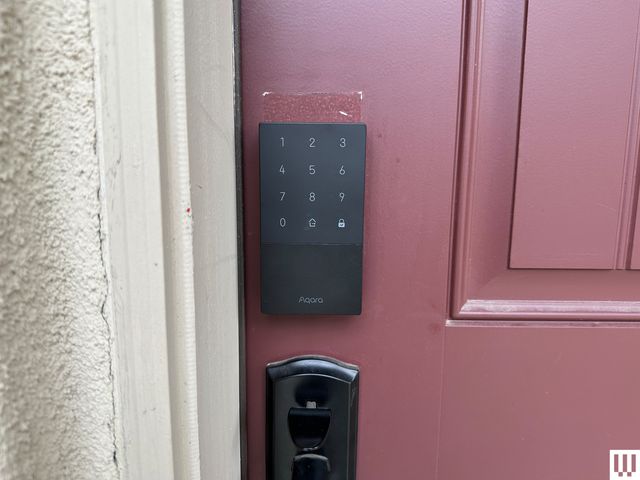
I really like the Aqara Smart Lock U50. It’s quick to install, affordable, and doesn’t look like a budget lock on my front door. This is a full dead-bolt replacement lock, replacing both the front and back pieces of a dead bolt on your front door. It’s easy to install. In fact, it’s one of the fastest installations I’ve done. It was even quick to remove and then put back onto my door after the next lock I set up didn’t work. It does have some tiny screws that will require a precision screwdriver. It’s also easy to take off and put back on; in between testing rounds, or if a lock I test fails to be usable, this is the lock I grab to put back on my door.
The U50’s sleek panel blended in nicely with my door, was consistently responsive, and had a high-end feel to it that seemed more expensive than the price tag. This lock previously wasn’t a pick because you needed Aqara’s expensive hubs to connect it to Wi-Fi, which often retails for more than the lock itself. But Aqara now has cheaper hubs like the M100 ($30), making this a truly affordable option.
I recommend placing the hub near the front door; when I had Aqara’s M3 hub ($150) on a different floor and different side of my house than the U50 lock, it frequently disconnected from the Wi-Fi. I also usually needed a Bluetooth connection to do anything serious, even when the Wi-Fi was working. Still, even if Wi-Fi wasn’t working right, the premade codes always worked, and it always remembered to lock itself after 10 minutes. It also knows whether the door is closed or not thanks to a built-in gyroscope—no separate door accessory required, which most other locks need to do the same feature.
This lock has a nice range of entry options beyond the keypad, including smart home control (including Apple Home), NFC cards (if you already have one), and even a hidden keyhole, with two keys included with the lock. In the months I tested this lock, I never had any battery issues or needed to replace the batteries, but there is a USB-C emergency port for charging if you need it. My main complaint is that the lock doesn’t have any security ratings like you’ll find on other smart locks; otherwise, it’s a fantastic smart lock.
| Specs | |
|---|---|
| Smart home ecosystem: | Amazon Alexa, Google Home, Apple HomeKit, IFTTT |
| Power source: | Four AA batteries (included), backup USB-C power |
| Entry options: | Keypad, fingerprint reader, NFC, smart home connection, mechanical key (two included) |
| Security rating: | None beyond weatherproofing |
| Weatherproof rating: | IPX5 |
| Encryption: | AES 128-bit encryption |
Best Design-Focused Smart Lock


The Level Lock Pro is easily the most visually pleasing lock I’ve tested. It’s also the smallest, with a diameter of only about 2.5 inches at its widest point on either side. The back is just the dial, while the front protrudes forward only an inch. From both sides of the door it truly looks like a small, normal lock. Level’s known for this, as its original lock, the Level Bolt ($199), hides entirely inside existing basic locks to add smarts without changing the style.
For such a small and discreet smart lock, the Level Lock Pro has an impressive array of features. The dual-core chip set has wide compatibility, including Matter and Apple Home, and it has a magnetometer to sense whether the door is open or closed without needing an additional accessory. Most smart locks with this feature require some kind of dongle, attachment, or sensor paired nearby. There’s a proximity sensor in the front of the lock so that it only activates things like Bluetooth and NFC when someone’s actually nearby, helping conserve battery. Speaking of, this lock also has an impressive battery life, claiming up to a year on a single CR2 battery. I’ve been using the Level Lock Pro for about two months, and so far the battery life is still “Healthy” per the app.
To get the most out of this lock, though, you’ll need accessories. At the very least you’ll want the Level Connect Wi-Fi Bridge ($79), which will connect the lock to (you guessed it!) your Wi-Fi. Without it, you won’t be able to control the lock if you’re out of Bluetooth range. I also really like the Level Keypad ($79), since I like to leave the house without my keys, and it’s faster to just type in the code than to use my phone (or check if I remembered that, either). It comes with two key fobs, which you can also use to unlock your front door, and it comes with two physical keys.
I’ve had this lock on my front door for the better part of six months, and I’m impressed with how well it’s consistently worked and am especially impressed by the battery. It has a single CR2 battery (that’s created by Level for this lock) inside of it and has yet to need a new one. The Level app doesn’t show exact percentages for battery life but currently reports my lock’s battery life as “Healthy.” Level’s replacement batteries come in two packs for $15, and after seeing how long this one lasts, it’s the only one I’d replace it with.
| Specs | |
|---|---|
| Smart home ecosystem: | Matter, Amazon Alexa, Google Home, Apple HomeKit |
| Power source: | CR2 battery (comes with one non-rechargeable battery, can replace with any CR2 battery when it runs out) |
| Entry options: | Key fobs, NFC, Apple Home Key, Bluetooth, physical key (two included), and keypad if purchased |
| Security rating: | BHMA Certified AAA and ANSI 156.18 and 156.40 Grade 1/A |
| Weatherproof rating: | IPX4 |
| Encryption: | Unconfirmed |
Best Smart Lock With Biometrics

- Tons of biometric entry options, including fingerprint and facial recognition
- Facial recognition uses IR sensors, so there’s no camera
- Has an included door sensor to tell if your door is open or closed
- Initial Bluetooth connection was frustrating, but Lockly has since issued a patch
- Expensive
If you thought the fingerprint reader on the above Yale Approach sounded handy, then let me introduce you to the Lockly Visage. Not only does the Visage have a fingerprint reader, but it has built-in sensors to recognize your face to unlock the door as you walk up. That’s right, this lock can see you coming.
When installing this lock, I recommend moving fast when you get to the battery stage. Don’t put in the rechargeable battery until you’ve downloaded the app, located the activation card inside the box (keep this safe in case you ever reset the lock), and are prepared to finish the in-app setup steps, specifically the Visage ID—Lockly’s face-recognition tech. The battery activates a Bluetooth signal that was only live for a few minutes in my testing, and you’ll need to input the code and finish the steps in that amount of time. Restarting it over and over is frustrating, but possible. Lockly says it has pushed an update to fix this short-lived Bluetooth window, but I’d still plan to be ready to roll once you put in the battery.
Once set up, I had zero connection issues and was happy with how quickly this lock could recognize my face as I walked up (even with sunglasses on!) and how quickly it could read my fingerprint. The Visage uses infrared (IR) sensors and a camera to see when a person is approaching and who they are. The sensors in the lock have both live-body detection and face recognition, so it isn’t spoofed by pictures. The infrared sensors have about a 2.6-foot range, and I did find that to feel accurate in my tests. The company promises that no stills are captured, and the live face-tracking data is encrypted and is saved on-device. It’s nice to have both the face and fingerprint options, so members of your household can choose whatever they prefer. There’s also a keypad and a regular mechanical key, with two keys included.
The Visage Zeno uses the Lockly Home app (iOS, Android), Lockly’s newest app. It works specifically with the Zeno line. There’s another Lockly app that will work with this lock, but it doesn’t look as nice. Within the app, you can easily generate codes for guests, customize notifications, and set up preferences, like having your door automatically lock after a certain amount of time.
A door sensor also sticks to your door below the lock, and a second part sits on the door jamb to sense whether or not the door is closed. You can customize notifications around that as well, and it’s a nice add-on, though the whole system isn’t the most attractive on the door itself—it’s a little cluttered.
| Specs | |
|---|---|
| Smart home ecosystem: | Amazon Alexa, Google Home, Apple HomeKit |
| Power source: | Rechargeable USB-C battery (two included), backup USB-C power |
| Entry options: | Keypad, fingerprint reader, infrared face recognition, mechanical key (two included) |
| Security rating: | ANSI Grade 2 |
| Weatherproof rating: | IP65 |
| Encryption: | AES 128-bit encryption, cloud data secured on AWS servers (US) |
Best Retrofit Smart Lock

- Works with your existing lock
- Can add on a keypad with a fingerprint reader
- Fairly quiet and does a good job with scheduled settings
- Not as powerful of a motor
- Need an Abode subscription to get full details about lock history
Yale’s lock might look like it’s a full lock replacement, but this is a retrofit design that only changes out the back of your thumb-turn deadbolt. That means your existing keys will still work, and everyone outside of your house will have no idea that it’s smart. It’s ideal for renters, but also nice for anyone who doesn’t want to switch out their front lock and swap keys. All of that also means installation was fast and easy—the hardest part is keeping your existing lock from falling to the ground while you swap out the backing, but it only takes a few minutes to complete.
As its name suggests, the Yale Approach Lock can sense when you approach. It uses your phone’s location to do this, and within the app, you place a small range to establish what counts as you “arriving” home. I have a patio and a small staircase between my door and my car, so I made a larger range that could sense me once I hit the staircase. That worked better than placing the range in the center of my home, since it wouldn’t count me as arriving until I was already at the door.
Yale’s parent company also owns another popular smart lock company, August. If you’ve used an August lock, then the included Wi-Fi bridge will look familiar, and August’s current offerings can include the Yale accessories I tested with this lock. The bridge connects to the smart lock via Bluetooth, so it has to be plugged in close to your door. This is what connects the lock to Wi-Fi for remote unlock functionality (plus other features). The whole setup is pretty similar to how August’s locks have worked in the past, though I like the design of the Yale Approach better than the silver cylinder of the August Wi-Fi Smart Lock ($200).
You can choose to get a keypad for the Approach, and there are two styles to choose from. The basic Keypad bundle ($160) includes Yale’s numerical Keypad, but the biometric Keypad Touch bundle ($134) has the numerical keypad and a fingerprint scanner. I recommend upgrading to the fingerprint reader—it’s insanely convenient and fast. Just a single touch and your door is unlocked. You can also purchase the lock without a keypad ($140) if you don’t have anywhere to place it, but keypads are a great addition to a smart lock, so that you can give out guest and temporary codes, and it also allows you to get inside without your keys or phone.
| Specs | |
|---|---|
| Smart home ecosystem: | Amazon Alexa, Google Home |
| Power source: | 4 AA batteries included |
| Entry options: | Optional keypad with fingerprint scanning, retains original key |
| Security rating: | N/A, depends on your lock |
| Weatherproof rating: | The external Keypad and Keypad Touch are IPX5 |
| Encryption: | AES 128 bit and TLS encryption |
Best for Sliding Doors


- Special design for sliding doors, and overall build quality is exceptional
- Built-in doorbell, but you’ll need to be nearby to hear it
- The instructions are complicated, and our reviewer needed a professional’s help to install
- There’s a risk that install will shatter your sliding door
- Can’t set up codes, fingerprints, or users in the app
The day I moved into my home, I realized the previous owner had not left me any keys for the sliding glass door that opens into my backyard. I reached out, and she … did not have them anymore. Great! I wanted to smarten up my home anyway, so I searched long and hard for smart locks built for sliding doors. Very few options exist. But I came across The Connected Shop, which was exactly what I was looking for (but super expensive). The company sent me the Next Gen Smart Lock to try. I’ve used it for more than a year, and it has functioned almost flawlessly in that time. Seriously, I’ve recharged the USB-C battery only once in that time.
Fair warning: The instructions are complicated. You may be able to do it yourself, but I could not. The Connected Shop’s technician had to cut a part of the strike plate on my existing hardware to get it to latch. He also had to drill new holes into my sliding door frame, and in the process he accidentally shattered the glass in the door. Welp! A representative says if it happened to a customer, the company would take care of it and replace the glass, as it did mine. I highly recommend contacting the company and sending a picture of your lock if you have concerns about door compatibility.
Once it’s installed, you may find yourself, as I did, riffling through the manual to initially set up users, codes, fingerprints, and the app connectivity. (The manual is needlessly complicated.) That process involves inputting a code, then pressing the right numbers to get to the settings you need. There’s no real need to connect it to the third-party Tuya Smart app (Android, iOS), because, annoyingly, you can’t set up codes, fingerprints, or users in the app. It’s mostly for deleting members, creating temporary passwords, and seeing unlock or doorbell notifications. It’s also where you can view battery life. (The company says you can remotely unlock over Wi-Fi in the app, but this works only when someone rings the doorbell, which is a little bizarre.)
There’s a lock and unlock button on the inside of the door, along with a manual knob, and a removable battery with a USB-C port for charging (again, I roughly have nine months on a single charge), though this will depend on how frequently you use your sliding glass door. It’s how I get to my backyard, so I do not use it as often as my front door. There is no handle, so I slide my door by pushing the side of the lock, which juts out from the door frame.
On the other end, you tap anywhere in the middle to have the number pad light up. There’s a doorbell function, though it’s hard to hear if you’re not in the lock’s vicinity. Just type in the code and press the unlock button, and that’s it. I predominantly use the fingerprint unlock, which works reliably once you get used to placing your finger on the sensor in a particular way. The Connected Shop also throws in two NFC tags—I leave one on my keychain—as a backup unlocking method, and there are two physical keys just in case (I have never used them). The only thing that has not worked is the company’s so-called Face Unlock. I’ve tried to set it up multiple times, and it always fails when it tries to scan my face. Honestly, I don’t care for this feature.
My only main concern is with the company itself. It’s fairly new (founded in 2021), so it’s not well established, and I can’t vouch for its customer service. (The people I interacted with were nice, but I’m also reviewing the company, so of course they were nice.) Its product pages could stand to use more information like encryption standards and water resistance ratings, and I didn’t find the company’s manuals very helpful. I’m not sure why the company doesn’t have its own app yet, and it claims support for Alexa and Google Home, but when I tried connecting the Tuya app to the latter, it didn’t bring over the lock.
That said, the Next Gen Smart Lock’s build quality is exceptional and far nicer than I was expecting, and it’s operating better than I expected. —Julian Chokkattu
| Specs | |
|---|---|
| Smart home ecosystem: | None |
| Power source: | Rechargeable USB-C battery, backup USB-C power |
| Entry options: | Keypad, fingerprint reader, face recognition, NFC tags, mechanical key (two included) |
| Security rating: | None |
| Weatherproof rating: | IP54 |
| Encryption: | AES 128-bit encryption |
Best for Garage Doors

- Has both an DIY and professional installation option, depending on your needs and budget
- Easy to use, and has alerts to let you know you left your garage open
- Can add on a video keypad to pair with the garage like a smart lock
- Camera feed doesn’t always connect with weaker Wi-Fi signals
You’re probably thinking, this must be for the door to get into the garage. You’re wrong. I mean the actual garage. My garage is controlled by a MyQ Smart Garage Opener, and it’s been a huge life improvement for the anxiously minded couple like myself and my husband. Worried whether the garage door is open after the scramble to play The Wiggles for our son while navigating the neighborhood? No problem, check the MyQ app. I’ve even set up the MyQ app to alert me if my garage stays open for more than 10 minutes. It’s a peace of mind, especially if your garage is a more frequently used access point to your home than the front door.
I wish I could tell you about the installation, but my house came with the MyQ Garage Door Opener (starting at $200, depending on the model) professionally installed (along with some other smart tech, with mixed results). It’s the best feature my house came with. My opener was professionally installed, and you can either DIY the installation or contact a local technician to get one. But you can also DIY the much cheaper MyQ Smart Garage Controller ($30) to add onto any garage, turning an existing opener into a smart one.
If you wish you had a keypad for your garage, you can add that with the MyQ Video Keypad ($80). It acts as both a keypad to open your garage (a great option if you tend to forget your phone) and a video doorbell feed that goes straight to your phone. The only issues I had with it were that it was heavy—command strips won’t work, you’ll need to drill it into your home’s exterior. The video feed also wasn’t always reliable, thanks to the lackluster Wi-Fi in my driveway. Test it with a laptop beforehand if that’s a feature you want (or perhaps add a Wi-Fi extender to your garage).
MyQ compatibility with other ecosystems focuses more on vehicles and security devices than it does on classic smart home assistants, which makes sense since you’re usually controlling it from outside of the home. It works with Amazon Key and Walmart+ InHome to get deliveries in your garage, with Ring, plus several cars, and IFTTT.
| Specs | |
|---|---|
| Smart home ecosystem: | IFTTT, Amazon Key, Ring, Walmart+ InHome, and vehicles |
| Power source: | Wired / outlet |
| Entry options: | App control, manual button, keypad (purchased separately) |
| Security rating: | None |
| Weatherproof rating: | Video keypad is rated IP55 |
| Encryption: | TLS encrypted, ISO 27001:2022 certified |
Comparing Our Top Smart Locks
| Model | Smart Home Compatibility | Power Source | Entry Options | Security Rating | Weatherproof Rating | Encryption |
|---|---|---|---|---|---|---|
| Aqara Smart Lock U50 | Amazon Alexa, Google Home, Apple HomeKit, IFTTT | Four AA batteries (included), backup USB-C power | Keypad, fingerprint reader, NFC, smart home connection, mechanical key (two included) | None | IPX5 | AES 128-bit encryption |
| Level Lock Pro | Matter, Amazon Alexa, Google Home, Apple HomeKit | CR2 battery (comes with one non-rechargeable battery, can replace with any CR2 battery when it runs out) | Key fobs, NFC, Apple Home Key, Bluetooth, physical key (two included), and keypad if purchased | BHMA Certified AAA and ANSI 156.18 and 156.40 Grade 1/A | IPX4 | |
| Lockly Visage Zeno Series Smart Lock | Amazon Alexa, Google Home, Apple HomeKit | Rechargeable USB-C battery (two included), backup USB-C power | Keypad, fingerprint reader, infrared face recognition, mechanical key (two included) | ANSI Grade 2 | IP65 | AES 128-bit encryption, cloud data secured on AWS servers (US) |
| Yale Approach Lock | Amazon Alexa, Google Home | 4 AA batteries included | Optional keypad with fingerprint scanning, retains original key | Depends on your original lock | None; external accessories are IPX5 | AES 128-bit and TLS encryption |
| The Connected Shop Next Gen Smart Lock | None | Rechargeable USB-C battery, backup USB-C power | Keypad, fingerprint reader, face recognition, NFC tags, mechanical key (two included) | None | IP54 | AES 128-bit encryption |
Disclaimer : This story is auto aggregated by a computer programme and has not been created or edited by DOWNTHENEWS. Publisher: wired.com