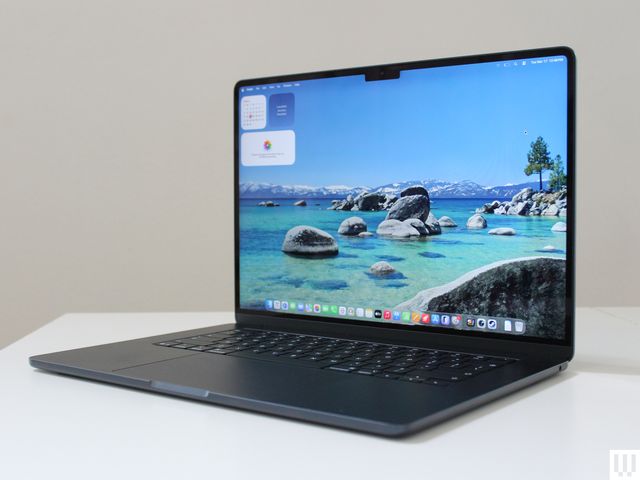
Apple has set the 2026 MacBook lineup. Complete with several MacBook Air and MacBook Pro models, along with the cheaper MacBook Neo, there’s a lot to consider before deciding on the MacBook that best suits your needs.
With a decade of MacBook testing under my belt, I feel confident in my ability to point you in the right direction, regardless of your budgetary restraints and performance needs. Speaking of budget, if you’re hunting for discounts, be aware that Apple recently increased MacBook prices, citing component supply constraints and the high cost of memory and storage chips.
For more recommendations, be sure to check out the rest of our computer buying guides, like the Best Laptops, Best Cheap Laptops, Best iPads, and Best Windows Laptops.
Updated July 2026: I’ve added context behind Apple’s recent price increase for models in its MacBook line.
- Is Now a Good Time to Buy?
- A Breakdown of Each M-Series Chip
- Which MacBooks Are Compatible With macOS 27 Golden Gate?
- Which Macs Support Apple Intelligence?
- Get AppleCare+ to Protect Your Devices
- Take Advantage of Apple’s Education Discounts
- The MacBook for Most People
- The Best MacBook for Students
- The Best MacBook for Pros Only
- The Awkward Middle Child of MacBooks
- Refurbished MacBooks to Consider or Avoid
- Great MacBook Accessories
The MacBook for Most People


Although the MacBook Neo is more affordable, and the M5 MacBook Pro offers a better display with the far more powerful M5 Pro and Max chips, the MacBook Air remains the model I recommend for most people. The 2026 refresh to the M5 chip isn’t particularly exciting in itself, but if you’re someone whose livelihood depends sitting in front of a MacBook all day, it’s the best option.
The starting price for the 13-inch model is now $1,299, up $200 from its previous price. Notably, for much of last year, you could buy this laptop for as little as $750. That’s a painful reality, yes, but it doesn’t change my recommendation about this being the MacBook model most people should buy.
Although the exterior of the MacBook Air hasn’t changed since 2021, Apple has slowly evolved the laptop into something that feels airy and near-weightless. There’s no concern that you’ll have one too many tabs or applications open, eating up all that memory. You won’t be sitting around waiting for a file to download, because the SSD is blazing fast. With support for up to two 5K external monitors, the MacBook Air can function as a proper workstation device when using a docking station. The 12-megapixel, 1080p webcam is plenty good for video calls.
What’s most importantly, the M5 is capable of so much more than what most people will ever attempt to do with their MacBook Air. Apple has boosted the GPU by so much over the past generations that the M5 is actually on par with the M3 Pro. You’ll probably spend most of your day in browser tabs, Slack, Zoom, office applications, and spreadsheets, but the MacBook Air can just as easily handle Photoshop or Lightroom. You can even dabble in video editing or some light gaming if you want. If you were a professional video editor, you’d likely be bothered by the render times. But if it’s more of a hobby or side project, the M5 MacBook Air likely likely impede your flow. Again, that’s where the MacBook Air really lives up to the idea of being a do-it-all laptop.
As always, there are two sizes, measured diagonally: 13.6-inch and 15.3-inch. Outside the $200 price gap, the size of the screen and the speakers are the only two notable differences between the two. Apple even scales the pixel density up to make sure the display on the 15-inch model looks every bit as sharp. The speakers on the 15-inch model sound incredible, outdone by only the 16-inch MacBook Pro. But choosing between the two sizes really comes down to how you use your laptop. If you have it plugged into an external monitor most days, you may as well get the 13-inch size and save yourself the extra space for when you need to port it around. But if you primarily work on just the laptop itself, having that 15.3-inch screen really makes a difference, especially for more complicated applications or for using Split View.
As you may notice, the M5 MacBook Air now starts with 512 GB of storage. That’s twice what previous models packed and helps to rationalize the price gap between the Neo and the Air. Having 512 GB of storage means you won’t have to worry about filling up your drive right away. This kind of headroom allows the technology to fade into the background—a design philosophy Apple has always championed.
Read my in-depth comparison between the MacBook Neo and MacBook Air for more information on how they stack.
| Specs |
|---|
| Display: 13.6-inch IPS panel, 2560 x 1664 at 60 Hz |
| Processor: Apple M5 (10-Core CPU/8-Core or 10-COre GPU) |
| Memory: 16, 24, or 32 GB |
| Storage: 512 GB (upgradeable to 4 TB) |
| Thickness: 0.44 inches |
| Weight: 2.7 pounds |
The Best MacBook for Students


The MacBook Neo (7/10, WIRED Recommends) is the new kid on the block, and it had a lot to prove. That’s especially true since it debuted at just $599, an unheard-of price point for Apple laptops—much less than any other model, even before recent price hikes took effect. And even though the MacBook Neo now starts at $699 after those price increases, it remains an aggressively affordable option. To keep pricing low, Apple had to make the following compromises:
- Only 8 GB of RAM
- A18 Pro mobile chip
- No backlit keyboard
- Outdated, slow USB-C ports
- Only supports one 4K external monitor
- No Touch ID (on $599 configuration)
- Slower internal SSD
- Mechanical trackpad (instead of haptic)
That’s a big list, and the memory limitation is the most significant drawback. Unlike on the MacBook Air, you can find the limits of the Neo fairly easily—and not on purpose. If you’re coming from a 16 GB MacBook Air, for example, you likely developed a habit of keeping idle applications or tabs open. On the MacBook Neo, you’ll need to be a bit more aware of what’s open to avoid slowdowns. You’ll also want to be aware of what ports you’re using, since only the rear USB-C port can support an external display. The other USB-C port is only USB 2.0, which is rated for a max of 480 megabits per second. That’s definitely not the one on which you want to transfer files. You may even need to be aware of who you’re sitting next to in a coffee shop if you don’t have the Touch ID model. We haven’t had to worry about these things on laptops for many years.
In exchange, Apple delivers an incredible front-of-screen experience on the MacBook Neo, never before seen on a laptop of this price. The display is sharper and brighter than anything else you can buy for $699, while the keyboard and trackpad are both excellent. Build quality is every bit as strong as any other Apple product, and at 0.50 inches thick, it’s still quite portable to carry around.
On top of all that, there are three really good features the Neo has over the Air. There’s a wider range of color options—and a lot of people will gravitate toward the Neo for that alone. My personal favorite change is the lack of a notch. While the bezels are slightly thicker, I’d still prefer a uniform screen without an ugly notch blocking part of my view. Perhaps most meaningfully, the Neo is reportedly the most repairable MacBook in the lineup, swapping out adhesives for screws on components such as the battery and speakers. This is great for classrooms and businesses hoping to keep fleets of these up to date without contributing as much to the mounting e-waste problem.
For the vast majority of the time, you’ll enjoy using the MacBook Neo and be glad you saved $500. As a parent, this should be the go-to device for high school and college students. It works equally well as a secondary laptop away from your workstation, or a small device for travel.
| Specs |
|---|
| Display: 13.0-inch IPS panel, 2408 x 1506 at 60 Hz |
| Processor: Apple A18 Pro (6-Core CPU/6-Core GPU) |
| Memory: 8 GB |
| Storage: 256 GB or 512 GB |
| Thickness: 0.50 inches |
| Weight: 2.7 pounds |
For Pros Only


The MacBook Pro (8/10, WIRED Recommends) isn’t for you. No, really, it probably isn’t. Even if you have grand plans for your creative career, the MacBook Pro is really not designed for aspirational use. The price alone should key you in on that, as should the capabilities of the MacBook Air. (Sidenote: When I’m talking about the MacBook Pro, I really mean the M5 Pro or M5 Max models. I’ll get to the base M5 MacBook later.)
With that out of the way, having decided that you are the target audience for the MacBook Pro and are willing to pay well over $2,000 to get a laptop worthy of your craft, the M5 Max MacBook Pro is unmatched in its capabilities. As always, the “Max” is primarily about considerably more GPU performance. Along with the option of two extra CPU cores, you can also get up to 40 GPU cores, each core with an AI accelerator built in.
There are three use cases where you can use the new power the M5 Max offers: creative applications, on-device AI processing, and gaming. Whether it’s 3D modeling, video editing, or some other resource-heavy application, the M5 Max MacBook Pro will tear through it. But the AI performance makes a significant jump ahead, too. I tested a 17-billion-parameter Llama-2 model, which was able to run at conversational speed locally, and it was 31 percent faster than running the same model on the M3 Max MacBook Pro.
Then there’s gaming. Nobody is going to buy the MacBook Pro for its gaming prowess alone, but it’s there when you want it. For the first time ever, you can do over 60 frames per second in Cyberpunk 2077 on the Ultra preset with no upscaling whatsoever. That’s an RTX 5070 Ti-level of laptop gaming performance. And unlike laptops that actually have that GPU, the MacBook Pro gets incredible battery life. Lastly, creative professionals will really enjoy the increased storage speed over previous generations.
Everything else about the MacBook Pro hasn’t changed over previous generations. The Mini-LED display is as gorgeous as ever, as are the speakers. You get a solid selection of ports, which includes three Thunderbolt 5 ports that give ample external display support. It’s at the top of its class in nearly every aspect. Like the MacBook Air, it’s been years since the MacBook Pro has received any external changes. Also like the Air, you still have the choice between two sizes that are very similar in performance. Again, the quality of the speakers and the screen size are the main points of consideration.
| Specs |
|---|
| Display: 16-inch Mini-LED XDR panel, 3456 x 2234 at 120 Hz |
| Processor: Apple M5 Pro (14-Core CPU/20-Core GPU) or M5 Max (14-Core CPU/40-Core GPU) |
| Memory: 24 GB (upgradeable to 128 GB) |
| Storage: 1 TB (upgradeable to 8 TB) |
| Thickness: 0.66 inches |
| Weight: 4.7 pounds |
The Awkward Middle Child
%2520source%2520luke%2520larsen.png)


Knowing whether to buy a MacBook Pro should be fairly straightforward, if only it weren’t for the M5 MacBook Pro. Offered only in the 14-inch size, this laptop is couched in between the 15-inch MacBook Air M5 and 14-inch MacBook Pro M5 Pro, now starting at $1,999 after Apple’s recent price hike. Of all the price increases, this MacBook Pro model got it the worst. It’s $400 more expensive now, which is a 20 percent increase over its previous price. While the laptop itself is powerful, well-designed, and long-lasting, its position in the lineup is now even more questionable. You only get around a 5 percent increase in performance over the MacBook Air, thanks to the active cooling inside. But that’s hardly a reason to spend hundreds of dollars more.
The only two other reasons to consider the M5 MacBook Pro over the M5 MacBook Air are the ports and the display. The MacBook Pro comes with an extra Thunderbolt port, as well as HDMI. Those are convenient and allow you to charge the MacBook Pro from both the left and right sides (unlike the MacBook Air). There used to be a larger disparity in external display support, but in the latest generations, the MacBook Air has caught up.
The screen is really where the MacBook Pro shines over the Air, though, sporting the same Mini-LED panel you get on the more expensive configurations. It can be cranked up to 1600 nits of peak brightness, which is nice for games, videos, and movies that support HDR. If you plan on watching a lot of movies and shows on your laptop because you don’t own a television, for example, that might be a reason to spend a bit more on the Pro.
The trade-off for buying the MacBook Pro is not only the extra cost, but also the extra size. It’s a thicker, heavier laptop than the MacBook Air. In the end, I think this is the one MacBook that tricks people into buying it because of the “Pro” label in the name. It’s not a bad laptop, but you really need to have a good reason for buying it over the MacBook Air.
| Specs |
|---|
| Display: 14.2-inch mini-LED XDR panel, 3024 x 1964 at 120 Hz |
| Processor: Apple M5 (10-core CPU/10-Core GPU) |
| Memory: 16 GB (upgradeable up to 128 GB) |
| Storage: 1 TB (upgradeable to 8 TB) |
| Thickness: 0.61 inches |
| Weight: M5: 3.4 pounds |
Advice on Buying Older MacBooks
You have to be very careful when shopping for older MacBooks. Don’t get me wrong: Since the introduction of Apple silicon in 2020, almost every MacBook Air and MacBook Pro has been a really good laptop. Never buy a MacBook that predates 2020, regardless of how cheap it is. Trust me.
But even buying an older Apple silicon model requires a discerning eye. Most dated generations of MacBooks are sold only as refurbished or secondhand, meaning there’s an added risk involved. Meanwhile, prices on refurbished models fluctuate frequently, so you’ll need to watch prices closely to get the best deal. I’d advise against using Apple’s own refurbished store, as the prices are often not as low as buying new models from third-party retailers like Amazon or Best Buy. However, third-party retailers are always a less risky option than buying used in a secondhand market like Facebook Marketplace or eBay.
With that in mind, here’s what I’d advise regarding buying an older MacBook.
MacBook Air (M4): The previous-generation MacBook Air is a fantastic laptop, but it’s no longer being sold new. However, you can now buy it refurbished for around $1,095. At only $200 cheaper than the M5 model, though, it’s a bit hard to recommend.
MacBook Air (M3): You can get a new M3 MacBook Air on Amazon right now, despite it being two years old. At $1,299, though, it’s certainly not worth buying since that’s the same price as the M5 model.
MacBook Air (M2): Retailers are no longer selling new M2 or M1 MacBook Airs, so they will all be refurbished (or renewed, in Amazon’s lingo). The M2 model was the first to introduce the new chassis design, which is still being used in MacBooks today. Interestingly, you can buy the renewed M2 MacBook Air for the exact same price as the new MacBook Neo right now. Since both come with only 8 GB of RAM, you’ll get a similar level of performance. When that’s the case, I’ll always recommend buying new, with the hopes that Apple will support it longer.
MacBook Air (M1): With the introduction of the Neo, refurbished M1 MacBook Air models have sunk to pretty dramatic lows. You can currently buy a refurbished M1 for $400 or less. While the M1 MacBook Air gets you a backlit keyboard, the new MacBook Neo is certainly the more handsome and portable of the two. Still, if you need something fairly limited and are willing to risk buying refurbished, I can see why an Apple silicon MacBook for less than $400 has its appeal.
MacBook Pro (14-inch, M4): This is no longer being sold new, but you can buy the refurbished model for $1,599. Earlier this year, you could have bought the brand-new M5 model for less than this. Sigh. Don’t buy it, though, as the M4 Pro is available for less.
MacBook Pro (M3 Pro or M3 Max): Given the prices to which these refurbished models have dropped, they may be worth considering, particularly for people who want a bit more performance than they’d get from a MacBook Air.
At this point, I do not recommend buying refurbished MacBook Pros from the M2 or M1 generation. I haven’t seen deals strong enough on them to justify purchasing something that old.
Great MacBook Accessories
There are a lot of MacBook accessories to enhance your experience, including cases and chargers for on-the-go and peripherals to use at your desk. Below, I’ve highlighted some of my top recommendations, but you can find more in my Best MacBook Accessories guide.

Native Union Laptop Stand for $80: I’ve tried many, many laptop stands, but I haven’t liked any as much as I like the Native Union Laptop Stand. It’s not only sturdy and highly adjustable, but it’s also the most beautifully designed laptop stand I’ve ever used.
Logitech Casa Pop-Up Desk for $180: This is a great solution if you constantly work on the go but prefer using an external keyboard and mouse with your laptop. The Casa Pop-Up Desk comes with a keyboard and trackpad that fit into a compact case that doubles as a laptop stand.
Apple Magic Keyboard with Touch ID (USB-C) for $146: Crafting a workstation around your MacBook? A stand-alone keyboard is a nice upgrade. It comes equipped with a Touch ID button, so you can use it to log in, download apps, and pay for purchases. It also has the same function row keys as M-series MacBooks, including a dedicated “Do Not Disturb” button, playback buttons, and a Mission Control key.
Bellroy Laptop Caddy for $49: While most laptop sleeves can handle the basics of keeping your MacBook safe in your purse or bag, I like that this laptop caddy offers a place for essentials like your power adapter, an iPad, or any other recommended accessories on this list.
Plugable USB-C Hub Multiport Adapter for $50: If you’re buying a MacBook Air, you’ll likely need some type of port adapter or hub at some point. The Plugable USB-C Hub Multiport Adapter is the best I’ve tested, offering just about every port you could need, along with enough power delivery to charge almost any MacBook. The metal chassis is a fitting friend for your MacBook in looks, too.
Baggu Puffy Laptop Sleeve for $34: This puffy laptop sleeve is adorable and protective. The Velcro enclosure is also strong enough that you won’t have to worry about your laptop accidentally sliding out.
Dell 27 Plus 4K for $299: Still think 4K monitors are expensive? This fantastic 4K monitor from Dell stomps those myths out of existence. It has a clean aesthetic, great image quality, and even a 120-Hz refresh rate. There’s a reason the Dell 27 Plus 4K (9/10, WIRED Recommends) is our most highly recommended product in my Best Monitors guide. It doesn’t support USB-C for single-cable charging, though, so if you’re coming from a MacBook Air, you might want to pay the extra $70 to upgrade to this model.
BenQ 5K Monitor (MA270S) for $1,000: If you own a MacBook Pro and need a monitor that can match the colors and sharpness of that screen, this BenQ monitor is right up your alley. Not only is it 5K, but it also comes with a specific color mode that precisely matches the color temperature of your MacBook to help you avoid discrepancy. If you’re a content creator, photographer, or video editor, this is one of the very best options out there.
Disclaimer : This story is auto aggregated by a computer programme and has not been created or edited by DOWNTHENEWS. Publisher: wired.com