Every summer, a group of my closest friends and I spend a week together on Fire Island. At this point in my life, it’s an annual tradition and one of the trips I look forward to most.
Once we arrive, the schedule is refreshingly simple. We spend long afternoons bouncing between the beach and the pool. Each night, someone takes a turn cooking dinner for the house. We catch up, play games and tell the same stories we’ve all heard a million times by now. Most importantly, we get a rare chance to reconnect without the distractions of our everyday lives.
At least, that’s the goal.
Because even when I’m physically on vacation, a part of my brain is already thinking about the Monday morning waiting for me back at my desk.
It usually starts innocently enough. I’ll wonder how a particular meeting went or how a project is tracking. Before long, I’m thinking about the emails, messages and meeting recaps accumulating while I’m away. Inevitably, my relaxing week off has a Monday morning cloud hanging over it.
This year, I wanted things to be different. Before leaving for Fire Island, I opened ZoomMate and set up a Return-to-Work Briefing. Work would still keep moving while I was gone, but I felt more confident that I could step away, be fully present on my trip and catch up once I returned.
The real problem with taking time off
Planning a vacation is usually the fun part. But for me, the harder part is mentally preparing for the stack of to-dos waiting for me when I return.
I work in partnerships, where multiple projects are typically moving forward at once. Even during a relatively calm week, meetings continue, clients provide feedback, timelines shift and new priorities emerge. My colleagues are more than capable of managing things without me, of course, but that doesn’t stop me from wondering what I’m missing.
That feeling can make it difficult to disconnect. You tell yourself you’ll check one message just to make sure everything is fine. Then you see a thread that needs context, which prompts an email reminding of an important deliverable. Before you know it, your brain is back at work, even if the rest of you is sitting beside a pool.

Daily Newsletter
Reward your inbox with the TPG Daily newsletter
Join over 700,000 readers for breaking news, in-depth guides and exclusive deals from TPG’s experts
By signing up, you will receive newsletters and promotional content and agree to our Terms of Use and acknowledge the data practices in our Privacy Policy. You may unsubscribe at any time.
And I’m not alone. According to Zoom’s OOO Index, 3 in 5 knowledge workers check or respond to work messages at least a few times during PTO, and a third check in at least once a day.
The frustrating part is that checking in rarely makes the return easier. In fact, almost 9 in 10 workers say it takes a day or more to feel fully caught up after returning, with over half saying it takes at least 3 days. It means sacrificing time away without ever getting the full picture of what I missed. Or worse, losing track of notifications and reminders I previewed poolside when I was supposed to be enjoying my time off.
I didn’t need a way to work more efficiently from vacation. I needed a way to feel comfortable not working during vacation.
That’s where ZoomMate comes in
ZoomMate is Zoom’s AI teammate, designed to surface useful information, help complete tasks and turn workplace conversations into actionable takeaways.
What appealed to me was not the idea of AI taking over my responsibilities. I wanted help organizing the noise that can make stepping away feel so daunting.
While I was off, meetings still happened, decisions were made, action items were assigned and deadlines moved closer. ZoomMate could help pull that information together, so I wouldn’t feel the need to track it in real time.
I was still responsible for deciding what needed my attention and what to do next. The information was simply easier to manage.
Once I had set it up, I closed my laptop, packed my bag and headed for the train.
The feature that changed everything for me: the Return-to-Work Briefing
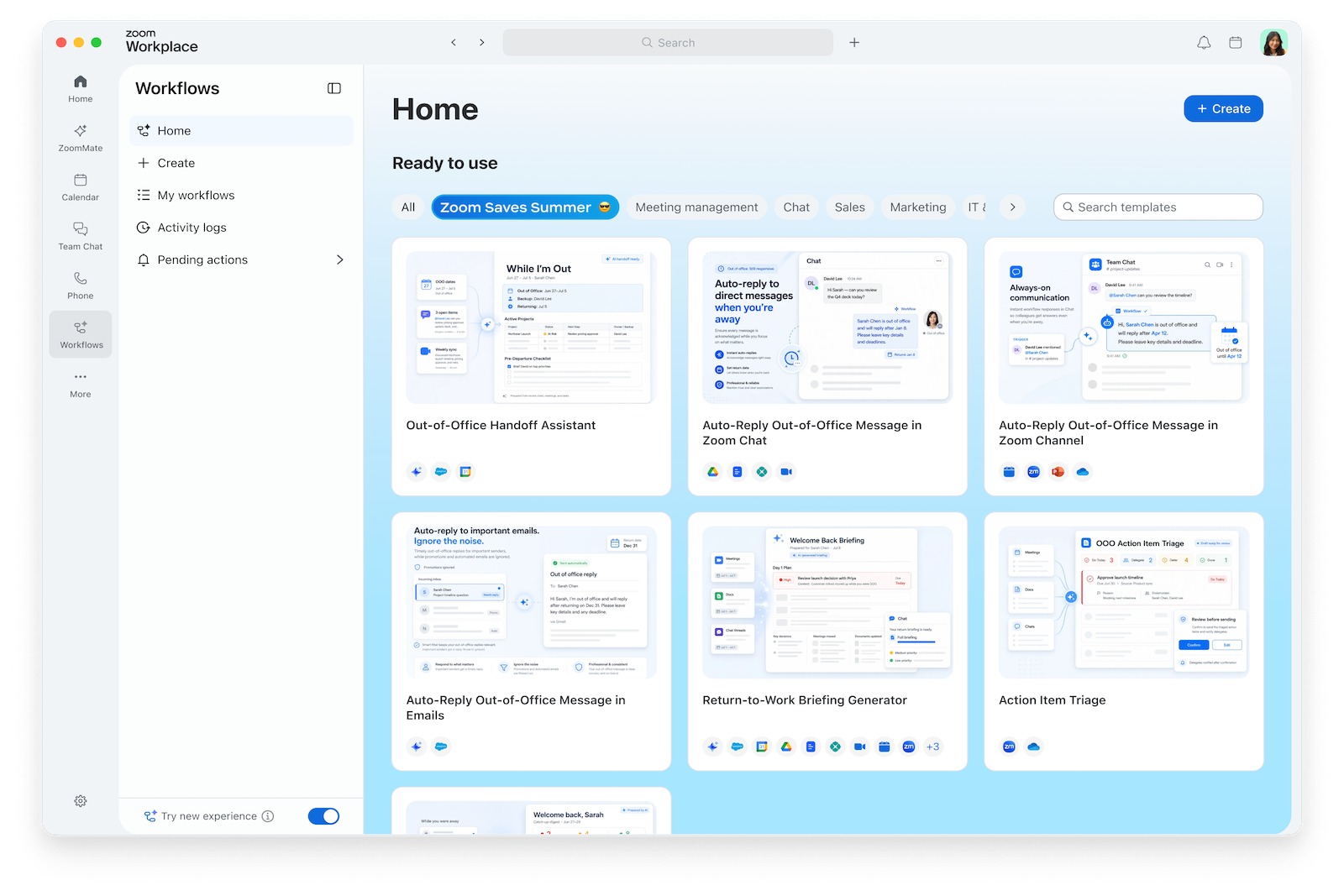
ZoomMate offers a collection of prebuilt workflows and the option to create custom ones. The one that immediately caught my attention was the Return-to-Work Briefing.
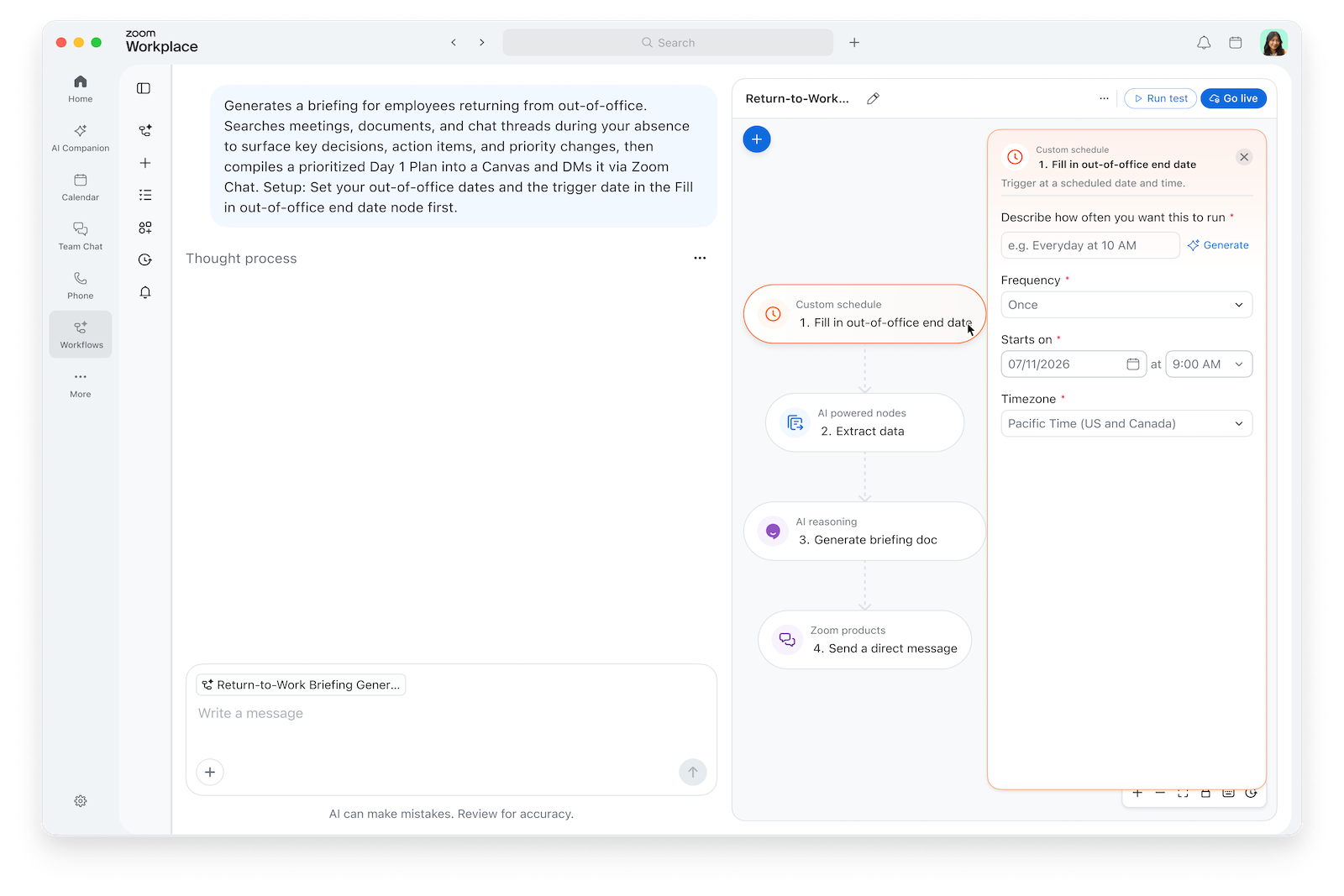
The setup was simple: I entered the dates I would be out of the office. From there, the workflow prepared a personalized briefing for my return.
That briefing was designed to summarize meetings held while I was away, highlight decisions and assigned action items, surface important chats and shared documents, identify changes in priorities and flag upcoming deadlines. It could then use that information to create a prioritized Day 1 Plan.
In other words, I didn’t need to spend my week on Fire Island mentally cataloging everything that might be happening back at work.
Instead, I could focus on what was right in front of me: mornings by the pool, afternoons at the beach and dinners around a table with some of my favorite people. I could play games without glancing at my phone between turns and listen to a friend’s story without mentally drafting my Monday to-do list.
I won’t pretend I completely forgot that work existed. I like my job, and I care about the projects I’m responsible for. But I didn’t feel the same temptation to repeatedly check in just to reassure myself that I hadn’t missed something important.
For the first time in a while, I felt like I had given myself permission to be fully present.
The real test came after the ferry and train that transported me back to the city.
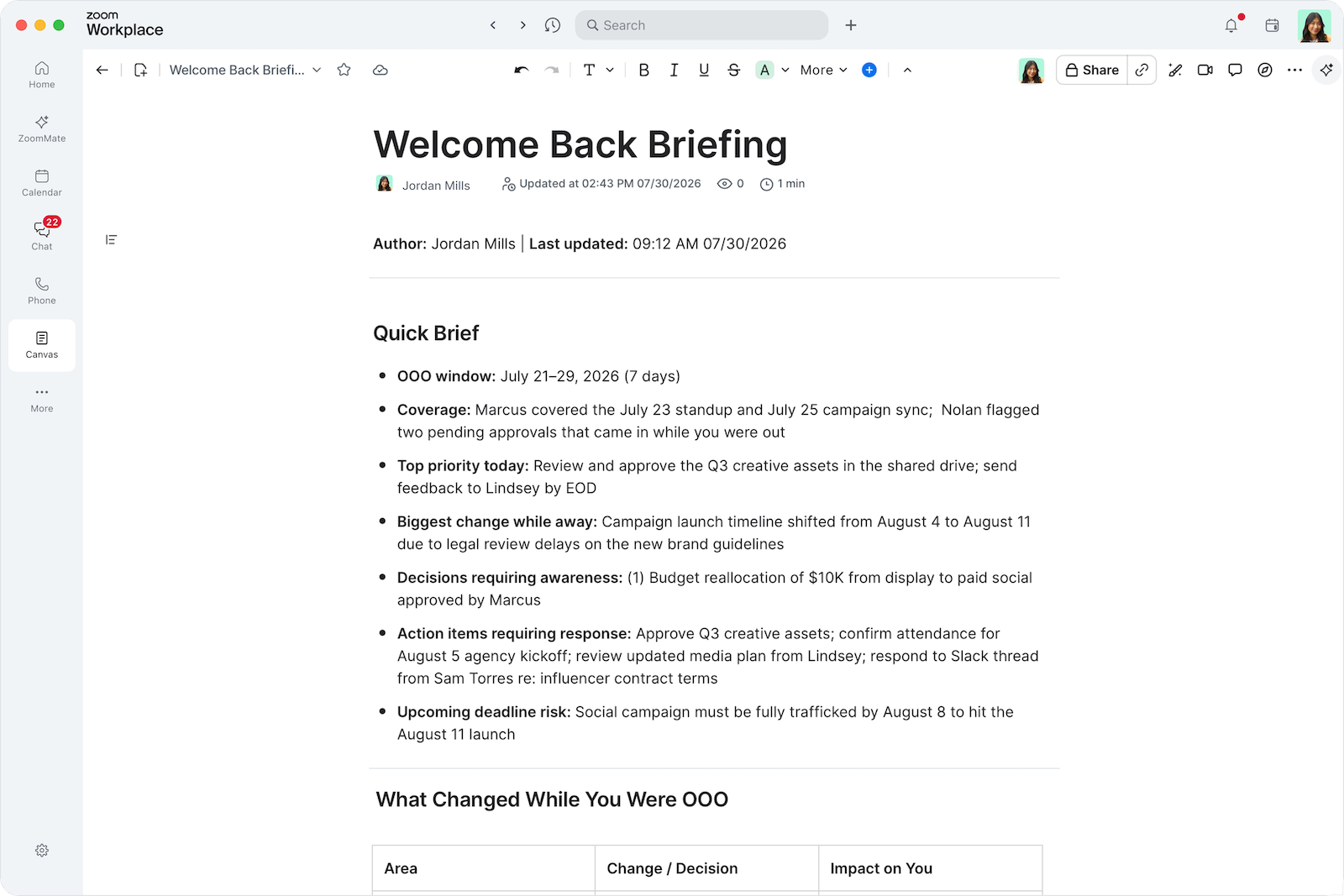
Normally, my first morning after PTO begins with opening several apps — like Asana and Outlook — and trying to reconstruct the previous week. I scan meeting titles, work backward through long message threads and open a barrage of tabs that I’m convinced will help me understand what happened. Often, I spend so much time figuring out where to begin that it’s hard to actually begin anything.
This time, I opened my laptop with a clearer starting point.
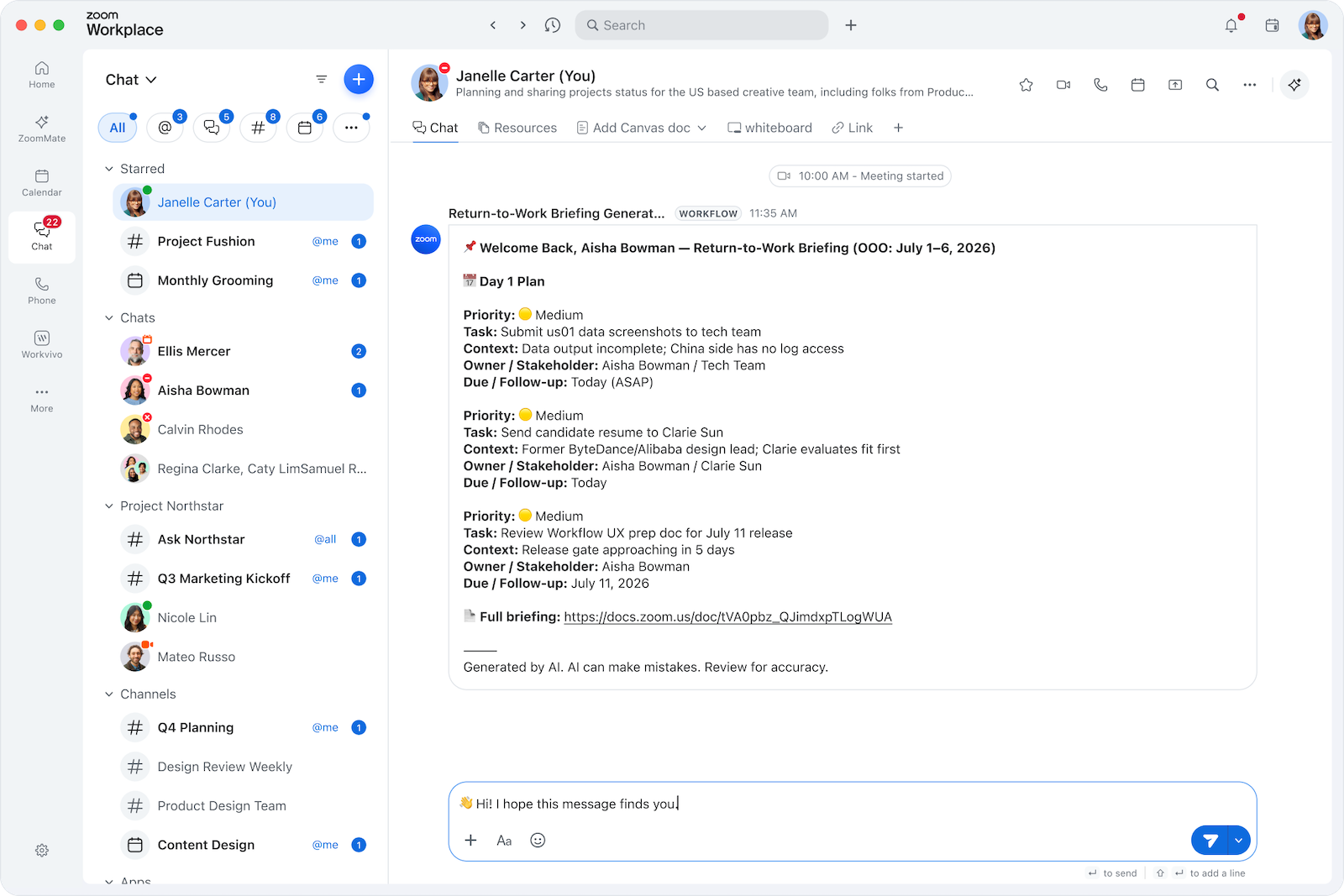
ZoomMate’s Return-to-Work Briefing helped pull together what had changed, what required my attention and what could wait. Its Day 1 Plan gave me a prioritized view of the work ahead rather than leaving me to treat every unread message like an equally urgent task.
It didn’t do my job for me. It helped me get back to it faster and more efficiently.
Other ways ZoomMate can reclaim your time
The Return-to-Work Briefing Workflow was the feature that won me over, but I also began to see how ZoomMate could help me manage my calendar, reduce meeting prep time and keep me organized throughout any typical workweek.
A substantial portion of my job involves collaboration across teams and figuring out what happens next. A meeting might result in a new creative direction, several rounds of follow-up and an entirely different set of deadlines. Important details are not always contained in a single, perfectly organized document. They can be spread across meetings, chats and shared files.
ZoomMate can help surface decisions from those conversations, answer questions using information across your work and turn discussions into useful outputs such as summaries, documents, presentations and action plans.
That can be especially useful after a meeting-heavy day. Rather than spending additional time piecing together my notes and searching for the document someone referenced halfway through a call, I can use ZoomMate to organize the information and identify the next steps.
These tools aren’t limited to vacations, either. Although my week on Fire Island was the perfect opportunity to test the Return-to-Work Briefing, this kind of thing happens all the time.
People step away for long weekends, appointments, family obligations and, even more regularly, lunch. Colleagues take overlapping vacations. Projects continue moving across time zones and schedules. Having an easier way to keep track of what happened can make closing the laptop less intimidating, even when the break is much shorter than a week.
Bottom line

No productivity tool can make a vacation completely stress-free. Travel delays happen, the politics of group dinners become surprisingly complicated, and someone always forgets to pack something important.
But work shouldn’t be the thing that prevents you from enjoying the time you worked hard to take off.
My annual Fire Island trip matters to me because it creates the space for my friends and me to slow down, reconnect and truly enjoy being together. I didn’t want to spend that time monitoring meetings or wondering which deadlines had changed in my absence.
By setting up ZoomMate’s Return-to-Work Briefing before I left, I felt more comfortable letting work continue while I was away. When I returned, I had a clearer picture of what I missed and where to begin as I got back into the swing of things.
If worrying about the return has been keeping you from booking the trip, taking the long weekend or simply stepping away for a bit, ZoomMate may help make that decision feel a little easier.
Disclaimer : This story is auto aggregated by a computer programme and has not been created or edited by DOWNTHENEWS. Publisher: thepointsguy.com