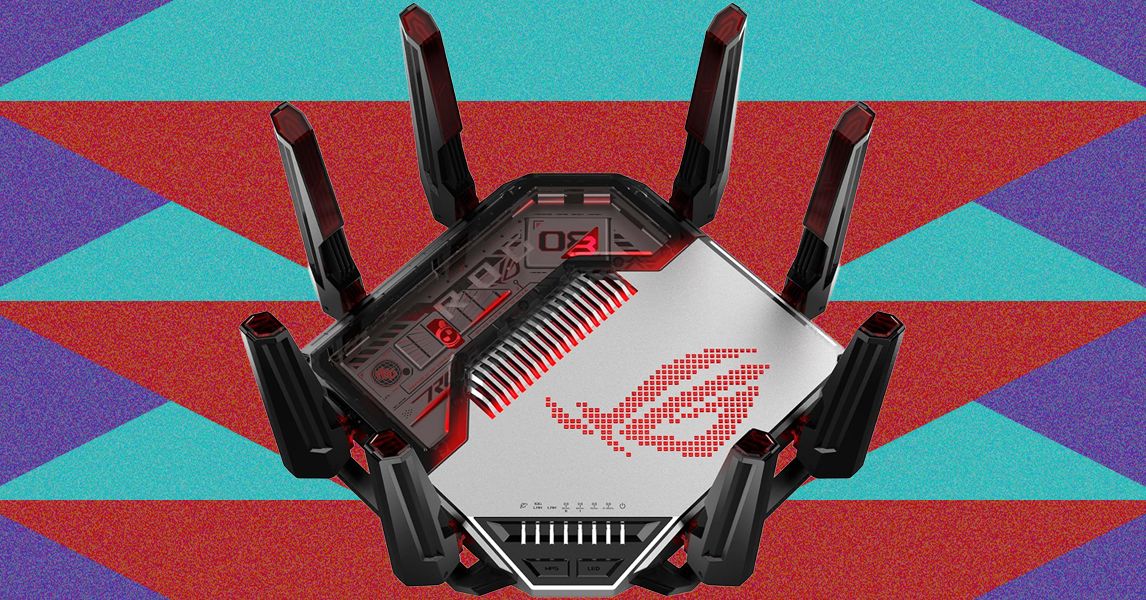
There are advantages to all this real estate. The advanced thermal design, with multiple heatsinks and channels for airflow, allows the router to operate at top performance reliably over the long term without a noisy fan. It remained silent and cool to the touch throughout my month of testing. There’s also space for a generous array of ports, including a 10Gbps WAN/LAN, a 10 Gbps LAN, four 2.5Gbps (one WAN/LAN), one 1Gbps LAN, a USB 3.2 Gen1, and a USB 2.0 port. You can even use link aggregation on the two 10 Gbps ports (y’know, just in case you need a 20 Gbps conduit).
Inside, you’ll find Broadcom’s BCM 6718 Wi-Fi chip, featuring a 2.6GHz quad-core processor, 256 MB of Flash memory, and 2 GB of DDR4 RAM. This is a quad-band router, so you have the usual 2.4 and 5 GHz bands, alongside two 6 GHz bands. I don’t want to drown you in spec soup here, but these are all 4 x 4 with OFDMA (Orthogonal Frequency Division Multiple Access), 4096-QAM, and maximum-width channels, so we’re talking theoretical top speeds of 1.3 Gbps for the 2.4 GHz band, 5.6 Gbps for the 5 GHz band, and 11.5 Gbps for each of the 6 GHz bands. If you need explanations of the jargon and why each of these specs matter, you’ll find them in my detailed guide to how to buy a router. Just know that this router is at the top of the game.
Further and Faster
Of course, you never get maximum speeds in real life, but the speed of the Asus ROG Rapture GT-BN98 Pro does not disappoint. You can reasonably expect up to 3 Gbps in the same room, around 1 Gbps through a wall, and I was still able to pull 350 Mbps at the bottom of my thick-walled old home’s garden. Comparing my upgrade pick of the best Wi-Fi routers, the tri-band Wi-Fi 7 Asus RT-BE96U, the GT-BN98 Pro proved slightly faster at all distances and longer-range across the board on every band. It also has an extra 6 GHz band, perfect for wireless backhaul if you want to use AiMesh (Asus’s mesh networking functionality) to create a mesh with another Asus router.
Multi-Link Operation (MLO), enabling you to connect devices on multiple bands simultaneously, seems to be maturing since its buggy debut with Wi-Fi 7. It enabled close-range speeds close to 5 Gbps in my tests, but that’s using a second Asus ROG Rapture GT-BN98 Pro as a client (most Wi-Fi 8 devices, when they arrive, won’t manage that).
Bear in mind that I can’t test the Automated Frequency Coordination (AFC) support yet, which cross-checks with licensed services in the area so your router can boost power for increased range and coverage on the 6 GHz band. It is available in the US and will be in the UK soon, but not every country allows it, and your mileage will vary depending on your local licensees.
Wi-Fi 8 isn’t primarily about higher speeds. It aims to improve stability and reliability with a raft of features that compensate for local interference and reduce latency for important tasks like gaming. The Asus ROG Rapture GT-BN98 Pro boasts adaptive Quality of Experience and device optimization, automatically recognizing gaming devices and streams and giving them priority.
Disclaimer : This story is auto aggregated by a computer programme and has not been created or edited by DOWNTHENEWS. Publisher: wired.com