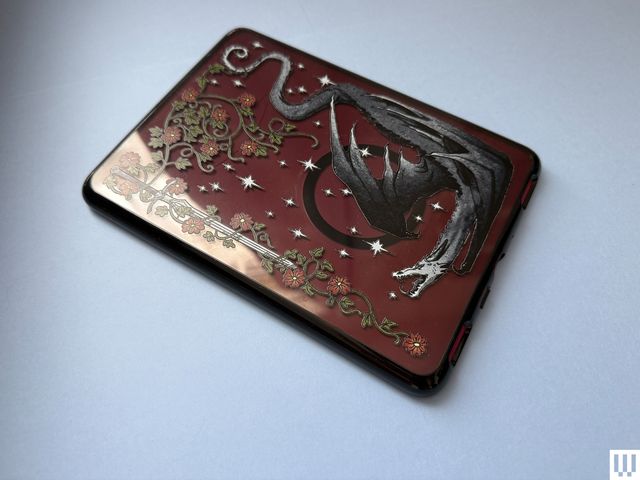
Your Kindle doesn’t have to be just a plain e-reader. The right Kindle accessories can transform the simple device into something that showcases your personality, makes it easier to read, or all of the above. Personally, I’m always looking for a way to hold up one less device in front of my face; I’m holding my phone enough already, thank you very much.
If you’re shopping around for new Kindle accessories, I’ve got you covered as a fellow reader and owner of every single current Kindle model. I’ve tried everything from clear cases you can fill with stickers to ones with built-in straps, and have tested straps you can add to your e-reader without needing a case. Stickers? Charms? Got ’em. Hate holding your Kindle up to read? The Kindle holders and page-turning remotes are for you. This guide will give you ideas on how to improve your own reading time or gift your favorite reader.
Updated August 2026: I’ve added a new section with compatible wall chargers and portable chargers, and updated pricing.
My Favorite Kindle Accessories


Kindle Cases and Covers
An easy must-have for any Kindle reader is a case or cover to protect your e-reader. Here are some of my favorites that I’ve tried on my various Kindles.
Kindle Straps and Grips
Looking for an easier way to hold your Kindle? Add these straps and grips right onto the Kindle or the case.
Kindle Holders
Hate holding up your Kindle? Or struggle with chronic pain that makes holding it feel terrible? These holders will literally take the weight out of your hands.
A Freestanding Charger
Looking to keep your Kindle charged without adding another cord to the floor of your desk or bedside table? Same. Here’s a more stylish solution if you have one of the Signature editions.
This wireless charging dock is made by Anker for Kindles, specifically for Kindle Paperwhite and Colorsoft’s 7-inch Signature editions. Those versions have wireless charging capabilities, and this stand takes advantage of that with charging coils that line up with the back of the Kindle, where the wireless charging is. You’ll want to take off any MagSafe cases; leaving mine on made the little light on the charging dock flash until I took it off.
n”,”productBrand”:”Anker”,”dangerousHed”:”Wireless Charging Dock for Kindle”,”embedSize”:”feature-medium”,”isFirstProduct”:false,”isSponsored”:false,”offerRetailer”:”Amazon”,”offerUrl”:”https://www.amazon.com/dp/B0CT2N9MBQ”,”contentType”:”product”,”productId”:”69eab29b8f33ddd56abe6ab6″,”productDetailPageUrl”:”/product/69eab29b8f33ddd56abe6ab6″,”showOfferUrl”:false,”showPriceOnButton”:true,”showAffiliateDisclaimerOnFirstProduct”:false,”enableAffiliateDisclaimerLabel”:false,”enableProductDetailPageTransfer”:false,”dangerousCredit”:”Photograph: Nena Farrell”,”showLocalisedOffers”:true,”hasCheckPriceFeature”:false,”isUpcEnabled”:true,”showClampedProductDescription”:true,”productDescriptionLineLength”:5,”hasReadMoreFeature”:false,”index”:4,”hasAffiliateLinkDisabled”:false,”isMobileView”:false,”showMultipleImageCount”:4,”hasProsConsFeature”:false,”hasRatingFeature”:false,”pros”:[],”cons”:[],”rating”:””,”shouldUseAmazonPrimeDayLiveAPIData”:false,”contentInfo”:{“contentUrl”:”https://www.wired.com/story/best-kindle-accessories/”,”contentName”:”The Best Kindle Accessories I’ve Tested”},”enableGtmFixesIntersectionObserver”:true,”enableGtmFixesUseRef”:true,”textBadge”:null,”seal”:null,”id”:”69eab29b8f33ddd56abe6ab6″,”brand”:{“name”:”Anker”},”offers”:[{“offerUrl”:”https://www.amazon.com/dp/B0CT2N9MBQ”,”price”:”$45″,”currency”:”USD”,”purchaseUri”:”https://cna.st/p/6UTpXEdi6sJuJZwuiqoyuxnerEiYHHm3PvJG7RbwcQMvfQTc2NoWmMVK1zEZdsJAC5MumJ1NYYR6sJjzHVoQH71PAxGHag5iL8GaZzNGAgmqWJYGzhtoRDHDTd8KE48vrMzAKRNexZBniyVpaNQrA6qPRAWJMsb4Cs2ygFUQFwG7kgZ8vNZAD1kyDwHLb99YciferjNmpRjiKxWFG3oD5Gkh7nEna2T41jp1Uu78jEaDvY3ZWHMXWzJ7iS86wpcUCPLSgZ4HBrWTnx6s9SDg5V3uqoBa29c3xfTnhmQ5wKfA16fy6RuWM1M78idrpcfKihj1B6i4DCvZUTX1S89vTPPrWkkZM9GCBB1QroJK51FBFVQCPt1Bh”,”sellerName”:”Amazon”,”countryCode”:”US”,”offerId”:”69eab2f17d137721e24f400b”,”reducedPrice”:””}],”component”:”enhanced_product_card”,”total_index”:2,”hasMultipleImage”:true,”showProsConsData”:false,”videoIds”:[],”offersLength”:1,”hasBookmarkingFeature”:true,”isBookmarked”:false,”isBookmarkStatusReady”:false}”>


This wireless charging dock is made by Anker for Kindles, specifically for Kindle Paperwhite and Colorsoft’s 7-inch Signature editions. Those versions have wireless charging capabilities, and this stand takes advantage of that with charging coils that line up with the back of the Kindle, where the wireless charging is. You’ll want to take off any MagSafe cases; leaving mine on made the little light on the charging dock flash until I took it off.
More Charger Options
If you’re getting a new Kindle, you might not be thrilled to discover you need to bring your own power base to charge it. And if you haven’t already switched over your home’s collection of wall chargers and bases to USB-C versions, you’ll be especially frustrated when you open the box and find only a USB-C cord and port on the Kindle itself. If you’re in the market for a new wall charger to pair with your Kindle, these are a couple of our favorites.
Looking to charge on the go? You shouldn’t need to with a Kindle’s long battery life. But in case you’re a serial battery drainer, you can try these portable power banks we love. If neither of these suit you, check out our complete guide to the Best Power Banks.
A Kindle Page Turner
The hottest new item to get as a Kindle lover is a page turner. They’re especially handy for holders like the ones above, where your hands aren’t already on the device, and can make for a great accessibility accessory for readers with different needs.
My biggest irritation with these devices so far is that you have to charge them both individually, and if one runs out of battery, the whole thing is useless. I also don’t love that the turner does tend to block at least one letter while I read, and you can’t place it on the lower or upper margins since it’ll activate the menus instead of turning the page. Still, it makes reading ultra comfortable, especially for my strained wrists.
Here’s my favorite one so far, that’s been solid at holding a charge, and next I’m testing this remote ($20) with a wearable ring clicker instead of a remote.
This remote comes in a variety of cute colors and is easy to use with its clip-on turner. You’ll need to charge both halves individually and place the thinner side of the clip onto your Kindle.
n”,”productBrand”:”Highgo”,”dangerousHed”:”Remote Control Page Turner for Kindle”,”embedSize”:”feature-medium”,”isFirstProduct”:false,”isSponsored”:false,”offerRetailer”:”Amazon”,”offerUrl”:”https://www.amazon.com/dp/B0DHLHV1RN”,”contentType”:”product”,”productId”:”6984f6b4530225167cc62385″,”productDetailPageUrl”:”/product/6984f6b4530225167cc62385″,”showOfferUrl”:false,”showPriceOnButton”:true,”showAffiliateDisclaimerOnFirstProduct”:false,”enableAffiliateDisclaimerLabel”:false,”enableProductDetailPageTransfer”:false,”dangerousCredit”:”Photograph: Nena Farrell”,”showLocalisedOffers”:true,”hasCheckPriceFeature”:false,”isUpcEnabled”:true,”showClampedProductDescription”:true,”productDescriptionLineLength”:5,”hasReadMoreFeature”:false,”index”:3,”hasAffiliateLinkDisabled”:false,”isMobileView”:false,”showMultipleImageCount”:4,”hasProsConsFeature”:false,”hasRatingFeature”:false,”pros”:[],”cons”:[],”rating”:””,”shouldUseAmazonPrimeDayLiveAPIData”:false,”contentInfo”:{“contentUrl”:”https://www.wired.com/story/best-kindle-accessories/”,”contentName”:”The Best Kindle Accessories I’ve Tested”},”enableGtmFixesIntersectionObserver”:true,”enableGtmFixesUseRef”:true,”textBadge”:null,”seal”:null,”id”:”6984f6b4530225167cc62385″,”brand”:{“name”:”Highgo”},”offers”:[{“offerUrl”:”https://www.amazon.com/dp/B0DHLHV1RN”,”price”:”$16″,”currency”:”USD”,”purchaseUri”:”https://cna.st/p/6UTpXEdi6sJuJZwuiqoyuxnerEiYHHm3PvJG7RbwcQMvfQTc2NoWmMVK1zEZdsJAC5MumJ1NYYR6sJjzHVoQH71UUWseyaZ1qt6FjVbNcAmMKGfn2VM8gECiM6bwuiJhqSeSMtWH7SLNsTG2WDFbxxEmNjPQw6jxTZFrvAntTAc7nyVFrNGNnbktBUahWaDAfhfiQPY1S2gSQ7sASEEHKpDFoChk1YEW2ENNvECp3D5KjRFSrZJNdoueEmtBLHsMr32xZZaho6ugKWnZhyoPHVgxeVcLmuG2tF8MUTh65ipFSRah6nDmwMLbtkVzuEpTQUjfHXWwPRPnwAXfmzgDLKjDFkXXatNhozbhGNgGiFz2E7nvUjvL3″,”sellerName”:”Amazon”,”countryCode”:”US”,”offerId”:”6984f6fea493d6fa11b74c63″,”reducedPrice”:””}],”component”:”enhanced_product_card”,”total_index”:2,”hasMultipleImage”:true,”showProsConsData”:false,”videoIds”:[],”offersLength”:1,”hasBookmarkingFeature”:true,”isBookmarked”:false,”isBookmarkStatusReady”:false}”>

Kindle Adornments
While everything else in this guide serves a protective or convenience purpose, this section features items with a singular purpose: fun. Here are a few I’ve liked adding to my Kindle.
Kindle Bags and Sleeves
Looking for a bag to tote your Kindle around? These belt bags have you covered with a specific size and special pockets designed to safely store your device. Sure, you could throw your Kindle in any old bag, but these will keep it secure and prevent scratches from your keys. If you’d rather use the bag you have but want a separate sleeve to keep it safe, we’ve got ideas for that too.
Disclaimer : This story is auto aggregated by a computer programme and has not been created or edited by DOWNTHENEWS. Publisher: wired.com