Comparing Our Favorite Kindles
What About the New Kindle Scribes?
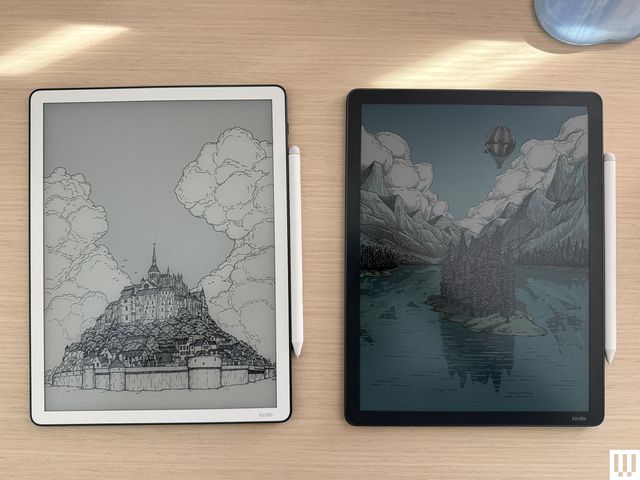
I got to test two of Amazon’s new Kindles, the Kindle Scribe ($500) and Kindle Scribe Colorsoft ($630), before they shipped to the public. Both have a similar look, though the Scribe Colorsoft has a color screen and a shorter battery life (only eight weeks of reading time, compared with 12 weeks for the black-and-white Scribes). Both have a new, taller design with an 11-inch screen, slightly slimmer form factor, and updated stylus. They both also have a quad-core chip and have a new homepage, will support a variety of AI features including AI search (along with some AI tools for summarizing books you’re reading without giving spoilers, but those won’t arrive until next year). Users can connect to Google Drive and Microsoft OneDrive to mark up documents.
Overall, I’d say they’re good devices, but as long as the cheaper second-generation Kindle Scribe is available, I think it’s the better buy. It also has AI capabilities and will get the same updated home page next year, so you really don’t need to upgrade. I’m also disappointed that these cost so much; for the price of the Scribe Colorsoft, you could get the more powerful reMarkable Paper Pro, which also has a color screen but can double as an e-paper tablet and almost laptop with its keyboard accessories.
There’s a base model Kindle Scribe without the front light ($430) due out this year, but as someone who loves to read in the dark, I don’t love this concept. We’ll see how I feel once it arrives; this guide will be updated with testing notes once it’s available.
Accessories for Easier Reading
If you’ve ever had a long reading session that gives you hand cramps, these accessories might help. You can check out more options in our Best Kindle Accessories guide.
Best Kindle Cases and Covers
Amazon Kindles are, thankfully, not as fragile as a pricey smartphone, but you may still want to add a cover to protect the screen if you’re frequently toting it around in a bag. These aren’t padded for serious drops, but are some of the best Kindle cases I’ve found for daily protection from scratches and scuffs.
Looking for more accessory ideas? Check out my guide to all of the best Kindle accessories. Also, don’t forget that if the Kids’ editions come with cases, so if you’re buying one of those, you won’t need a case.
About Those Older Kindles
Amazon doesn’t release new Kindles often—the company usually takes a few years between models. Whenever a new one arrives, its predecessor’s stock starts to dwindle. It’s not that we don’t recommend these per se, but we only suggest these if you can find them on sale for the right price. Otherwise, we recommend buying the latest version.
Before making your purchase, cross-check the price with the latest model to make sure you’re spending a fair amount less on the older device.
Kindle (2022, 11th Generation): This is the smallest of the lot at 6.2 inches tall and 4.3 inches wide, with a 6-inch screen. If you find tablets too cumbersome to hold with one hand, consider this one. With this model, Amazon doubled the storage to 16 gigabytes and upgraded the display to 300 pixels per inch (PPI) resolution (up from 167 PPI). It’s tough to find, and I usually don’t see it for less than $75 these days.
Kindle Paperwhite (2021, 11th Generation): This is the next step up from the basic model. It has a bright 6.8-inch screen with adjustable warm lighting, a fast page-turn rate, a USB-C port, and 16 gigs of storage. It’s waterproof too. We like the Signature Edition, which also includes auto-adjust brightness and 32 gigabytes of storage. Don’t recommend spending more than $100 if you can find them.
Kindle Scribe (1st Generation): The original Scribe is a great option for note-takers. It has a giant 10.2-inch screen for taking notes, marking up PDFs, or drawing, and numerous paper formats you can choose, like college-ruled or dotted. It also comes with the Basic Pen, which feels natural to write with and attaches to the side of the Scribe magnetically. It’s only worth it for $230 or less.
Kindle Kids (2022): This is an older kid-friendly model. It comes with a cover, a year’s subscription to Amazon Kids+, parental controls, and a two-year warranty, but the fact that it’s only available secondhand means you’ll likely miss out on the subscription window and may or may not still have a cover. Don’t spend more than $70 on this one.
Kindle Paperwhite Kids (2021): This older Paperwhite version is a step up from the previous basic Kids models. It has a high-resolution 300-ppi display with an adjustable warm screen and is also waterproof. You shouldn’t spend more than $110 on this one.
Power up with unlimited access to WIRED. Get best-in-class reporting and exclusive subscriber content that’s too important to ignore. Subscribe Today.
Disclaimer : This story is auto aggregated by a computer programme and has not been created or edited by DOWNTHENEWS. Publisher: wired.com