Comparing Our Favorite Kindles
What Are the New Kindles?
Amazon announced today that there’s a whole new generation of Kindles coming, with every model getting a new version. Here are the details; I’ll be updating this guide soon with thoughts as we review each model.
- Kindle (2026, 12th Generation) for $150: This is the new version of the base Kindle, with many features that will sound familiar (a 6-inch screen, six weeks of battery life, and 16 GB of storage) but a new flush-front design for the screen and lighter weight. It maintains the new $150 price tag that the older base Kindle just moved to in August. You can also choose the Aluminum version that has a more premium feel and different colors, plus 32 GB of storage. Both versions are available now.
- Kindle Paperwhite (2026, 13th Generation) for $200: The 2026 Kindle Paperwhite will still pack a waterproof design and 12 weeks of battery life (my favorite part!), but now promises an updated display with the largest Kindle Paperwhite screen yet and a higher contrast ratio. The Signature Edition will now have aluminum backing, and also pack dock charging with pogo pins on the back and a double tap to turn pages. The regular Paperwhite is available for preorder and retails for $200 (same as the old model) with 16 GB of storage and comes in only black, while the Paperwhite Signature Edition is also on preorder for $250 and comes in two colors with 32 GB of storage. The preorder is available on a rolling basis in various regions, so it might not be available in yours right away.
- Kindle Colorsoft (2026, 2nd Generation) for $290: The Kindle Colorsoft gets a second-generation model with an updated display and edge-to-edge color, and promises richer color than the first generation. It gets a similar new flush-front design to the other Kindle models, and also comes in a Signature Edition that has aluminum backing, an auto-adjusting front light, pogo points for charging, and the double-tap to turn pages. The new Colorsoft is available for preorder at $290 and with 16 GB of storage, while the new Colorsoft Signature Edition is also on preorder for $320 with 32 GB of storage and two device colors to choose from. Similar to the Paperwhite, the preorders are rolling out to various regions, so keep an eye out if it’s not available for you yet.
- Kindle Kids models starting at $180: All three of the above models will have a Kids version that will include kid-friendly covers and 12 months of Amazon Kids+ content. The base Kindle Kids is available now, while others are on preorder in certain regions.
That’s not all Kindle has coming out. There will also be a handful of new accessories, including the Kindle Click ($35) Bluetooth remote that will work with Kindle models as early as 2024, a Page-Turn Cover ($80), a Charging Dock ($60) designed to work with the pogo pins on the Signature Editions, and new Kindle covers in a variety of colors and textures. I’m most excited about the remote; I will update this guide and our Best Kindle Accessories guide with my notes as I test.
Why Are Kindles More Expensive Now?
Amazon raised its prices across its product categories, including Kindle devices. The price increases hit several current Kindle models, leaving only the recent Kindle Scribe models with the original price tag. Amazon declined to comment to WIRED, but a spokesperson told CNET the price hikes were due to rising costs in memory and storage components. It’s interesting that none of the more powerful Scribe models needed a price update, but it’s also a relief since all three of those models are significantly more expensive than a regular Kindle.
Here are all the increases, including Signature versions:
If you have your eyes on one of these Kindles, I’d wait until Amazon Prime Day or Black Friday to shop when they’re on sale. It’s likely the sale prices will only bring the Kindle down to the price it was before, but better than paying more.
What About the New Kindle Scribes?
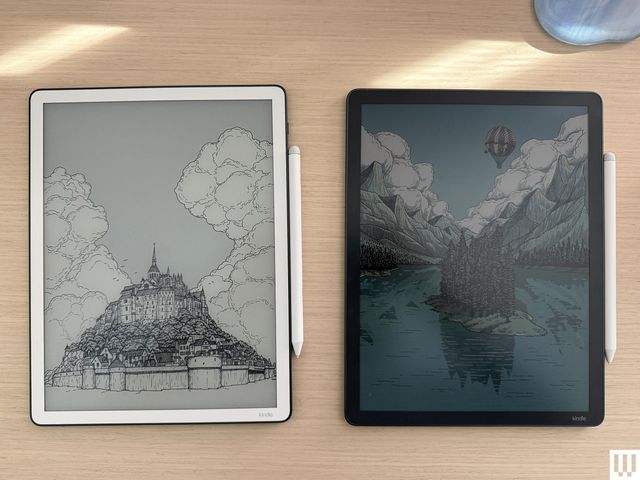
Kindle has three new Kindle Scribes that launched between late 2025 and June 2026. There are now the Kindle Scribe ($500), Kindle Scribe Colorsoft ($630), and the Kindle Scribe Without Front Light ($430). All three have a similar design and software experience, though the Scribe Colorsoft has a color screen and a shorter battery life—only eight weeks of reading time, compared to 12 weeks on the $500 Scribe and an impressive 16 weeks on the Scribe Without Front Light. Like the second-generation model, they’re a great choice for note-takers and students, especially with the long battery life, but I still prefer the second-generation’s price point.
All three models have a new, taller design with an 11-inch screen, a slightly slimmer form factor, and an updated stylus. They both also have a quad-core chip, a new homepage, and will support a variety of AI features, including AI search (along with some AI tools for summarizing books you’re reading without giving spoilers, though those won’t arrive until next year). Users can connect to Google Drive and Microsoft OneDrive to mark up documents, which the older model can’t do.
Overall, I’d say they’re good devices, but as long as the cheaper second-generation Kindle Scribe is available, I think it’s the better buy. It has some AI capabilities but no AI search, and has a different homepage design that matches a classic Kindle rather than the notebook-forward design the new ones have. Amazon said it’ll get the same homepage this year, but I haven’t seen it so far. I’m disappointed these new devices are so much more expensive; at that price, you might as well shop reMarkable’s line of digital notebooks and get better features and accessories.
Accessories for Easier Reading
If you’ve ever had a long reading session that gives you hand cramps, these accessories might help. You can check out more options in our Best Kindle Accessories guide.
Cases and Covers
Amazon Kindles are, thankfully, not as fragile as a pricey smartphone, but you may still want to add a cover to protect the screen if you’re frequently toting it around in a bag. These aren’t padded for serious drops, but they are some of the best Kindle cases I’ve found for daily protection from scratches and scuffs. Also, don’t forget that the Kids’ editions come with cases, so if you’re buying one of those, you won’t need a case.
About Those Older Kindles
Amazon doesn’t release new Kindles often—the company usually takes a few years between models. Whenever a new one arrives, its predecessor’s stock starts to dwindle. It’s not that we don’t recommend these per se, but I only suggest these if you can find them on sale for the right price. And don’t buy too old a model, since Amazon has started pulling support for older Kindles.
Before making your purchase, cross-check the price against the latest model to make sure you’re paying a fair amount less for the older device.
Kindle (2022, 11th Generation): This is the smallest of the lot at 6.2 inches tall and 4.3 inches wide, with a 6-inch screen. If you find tablets too cumbersome to hold with one hand, consider this one. With this model, Amazon doubled the storage to 16 gigabytes and upgraded the display to 300 pixels per inch (PPI) resolution (up from 167 PPI). It’s tough to find, and I usually don’t see it for less than $75 these days.
Kindle Paperwhite (2021, 11th Generation): This is the next step up from the basic model. It has a bright 6.8-inch screen with adjustable warm lighting, a fast page-turn rate, a USB-C port, and 16 gigs of storage. It’s waterproof too. We like the Signature Edition, which also includes auto-adjust brightness and 32 gigabytes of storage. Don’t recommend spending more than $100 if you can find them.
Kindle Scribe (1st Generation): The original Scribe is a great option for note-takers. It has a giant 10.2-inch screen for taking notes, marking up PDFs, or drawing, and numerous paper formats you can choose, like college-ruled or dotted. It also comes with the Basic Pen, which feels natural to write with and attaches to the side of the Scribe magnetically. It’s only worth it for $230 or less, and I often see it for under $200 on eBay.
Kindle Kids (2022): This is an older kid-friendly model. It comes with a cover, a year’s subscription to Amazon Kids+, parental controls, and a two-year warranty, but the fact that it’s only available secondhand means you’ll likely miss out on the subscription window and may or may not still have a cover. Ideally, don’t spend more than $70 on this one.
Kindle Paperwhite Kids (2021): This older Paperwhite version is a step up from the previous basic Kids models. It has a high-resolution 300-ppi display with an adjustable warm screen and is also waterproof. You shouldn’t spend more than $110 on this one.
Power up with unlimited access to WIRED. Get best-in-class reporting and exclusive subscriber content that’s too important to ignore. Subscribe Today.
Disclaimer : This story is auto aggregated by a computer programme and has not been created or edited by DOWNTHENEWS. Publisher: wired.com